Textpattern CMS support forum
You are not logged in. Register | Login | Help
- Topics: Active | Unanswered
#511 2026-01-01 16:35:07

Re: com_connect - form and contact mailer
jayrope wrote #342062:
Thank you, Jakob. I am not versed with patterns, or RegEx for that matter…
Most of the above is very simple. IIRC a regular term on a blank line also works, so it doesn’t need to be a regex expression. If you wrap the expression with two equal characters, e.g. /…/ then the expression will be processed. The rules above are:
[abc] = one of the contained letters, e.g either a, b, or c
(one|two|three) = one of the contained terms, e.g. either "one", "two", or "three"
\s = One or more spaces, tabs, etc.
? = with or without the preceding item, e.g. \s? = zero or more spaces
(something)? = with or without the preceding group
…and there are many more. regex101.com is a useful site and has a quick reference panel with more options.
TXP Builders – finely-crafted code, design and txp
Offline
#512 2026-01-21 11:57:22
- Gallex
- Member
- Registered: 2006-10-08
- Posts: 1,333
Re: com_connect - form and contact mailer
jakob wrote #342061:
And there’s another even more effective method which swaps out the form action after a time delay, causing automated bots which fill out forms quickly to land in nirvana while allowing regular (slower) people to submit the form.
Use the
delayattribute to specify the number of seconds before it switches the form action and theactionattribute to specify an alternative (e.g. throwaway) action target, followed by the real one. If it’s the same page as the form, just end the attribute with a comma. Both go in the initialtxp:com_connecttag, for example:
delay="5-15" action="https://binit.domain.com/,"...I found that to be most effective so far.
I also asked Claude AI for a good anti-spam solution and he suggested a so-called “honeypot” solution. Sorry if this solution is already integrated into the plugin.
Here’s a honeypot-only solution:
<script>
  // Wait 3 seconds before enabling the submit button
  setTimeout(function() {
    var submitBtn = document.getElementById('submit-btn');
    var hpField = document.getElementById('honeypot');

    // Enable button only if honeypot is empty
    if (submitBtn && hpField && hpField.value === "") {
      submitBtn.disabled = false;
      submitBtn.style.opacity = "1";
    }
  }, 3000);

  // Additional check: if bot fills the honeypot, lock the button immediately
  function checkBot(val) {
    var btn = document.getElementById('submit-btn');
    if (val !== "") {
      btn.disabled = true;
      btn.style.opacity = "0.5";
    }
  }
</script>

<style>
  #submit-btn {cursor: pointer;}
  #submit-btn:disabled { opacity: 0.5; cursor: not-allowed; }
  .v-hidden { position: absolute; left: -9999px; top: -9999px; visibility: hidden; }
</style>
<txp:com_connect
---
<div class="v-hidden">
<input type="text" name="website" id="honeypot" onchange="checkBot(this.value)" autocomplete="off" tabindex="-1">
</div>
<txp:com_connect_submit label="Send" id="submit-btn" disabled="disabled" />
</txp:com_connect>This solution uses only a honeypot field (hidden from real users but visible to bots) plus a 3-second delay before enabling the submit button. No reCAPTCHA included.
Last edited by Gallex (2026-01-21 12:02:06)
Offline
#513 2026-01-23 00:44:05
Re: com_connect - form and contact mailer
Gallex wrote #342326:
This solution uses only a honeypot field (hidden from real users but visible to bots) plus a 3-second delay before enabling the submit button. No reCAPTCHA included.
That is basically the same honeypot solution as is build in the plugin with the delay attribute and some invisible (hidden) field.
The possible advantage of yours is that it would work with some strict CSP that requires nonces and limits inline script blocks, which is where the latest versions of com_connect fail (issue).
In low-power mode.
Sand space – admin theme for Textpattern
phiw13 on Codeberg
Offline
#514 2026-01-23 01:06:08

Re: com_connect - form and contact mailer
Ack, thanks for the nudge on that CSP issue. I’ll see if it can be solved.
The smd plugin menagerie — for when you need one more gribble of power from Textpattern. Bleeding-edge code available on GitHub.
Hire Txp Builders – finely-crafted code, design and Txp
Offline
#515 2026-03-26 15:50:38

Re: com_connect - form and contact mailer
I am having a devil of a time in installing a contact page that is styled with css and that is safe against bots etc.
But in the meantime–– is this instruction correct?
The simplest form is shown below:

 <txp:com_connect to="recipient@example.com" />

To specify fields explicitly, use something like this:

  <txp:com_connect to="recipient@example.com">
    <txp:com_connect_email />
    <txp:com_connect_text label="Phone" min="7" max="15" />
    <txp:com_connect_textarea label="Your question" />
    <txp:com_connect_submit label="Send" />
</txp:com_connect>

Alternatively, place the field specifications in a Textpattern form, and call it like this:

 <txp:com_connect to="recipient@example.com" form="my-contact-form" />
that last line doesn’t work for me––but this does :
<txp:output_form form="contact_form" />So are the instructions incorrect or if not, they seem ambiguous….
As for trying to add a styled form and bot safe that is proving challenging. I tried for hours just to style the submit button without any luck.
Why not included a fully documented working example, where all one has to do is change the css styles and use their own email?
…. texted postive
Offline
#516 2026-03-26 17:05:47
Re: com_connect - form and contact mailer
Hi Walter. In its simplest form that should work as you showed:
- Make sure you have the most recent version of the plugin from the releases page on GitHub if you are on Textpattern 4.9
- Grab com_connect_v4.9.0.txt from that page.
- Copy the plugin and install on your site.
- Make sure you have activated it.
I tried the first snippet you showed above on the demo site and it worked immediately. The styling is still quite basic but it is a starting point. It adds a br between the label and input as standard, but if you add
.comConnectForm input,
.comConnectForm textarea {
    display: block;
    margin-block-end: 1rem;
}
you already get passable output.
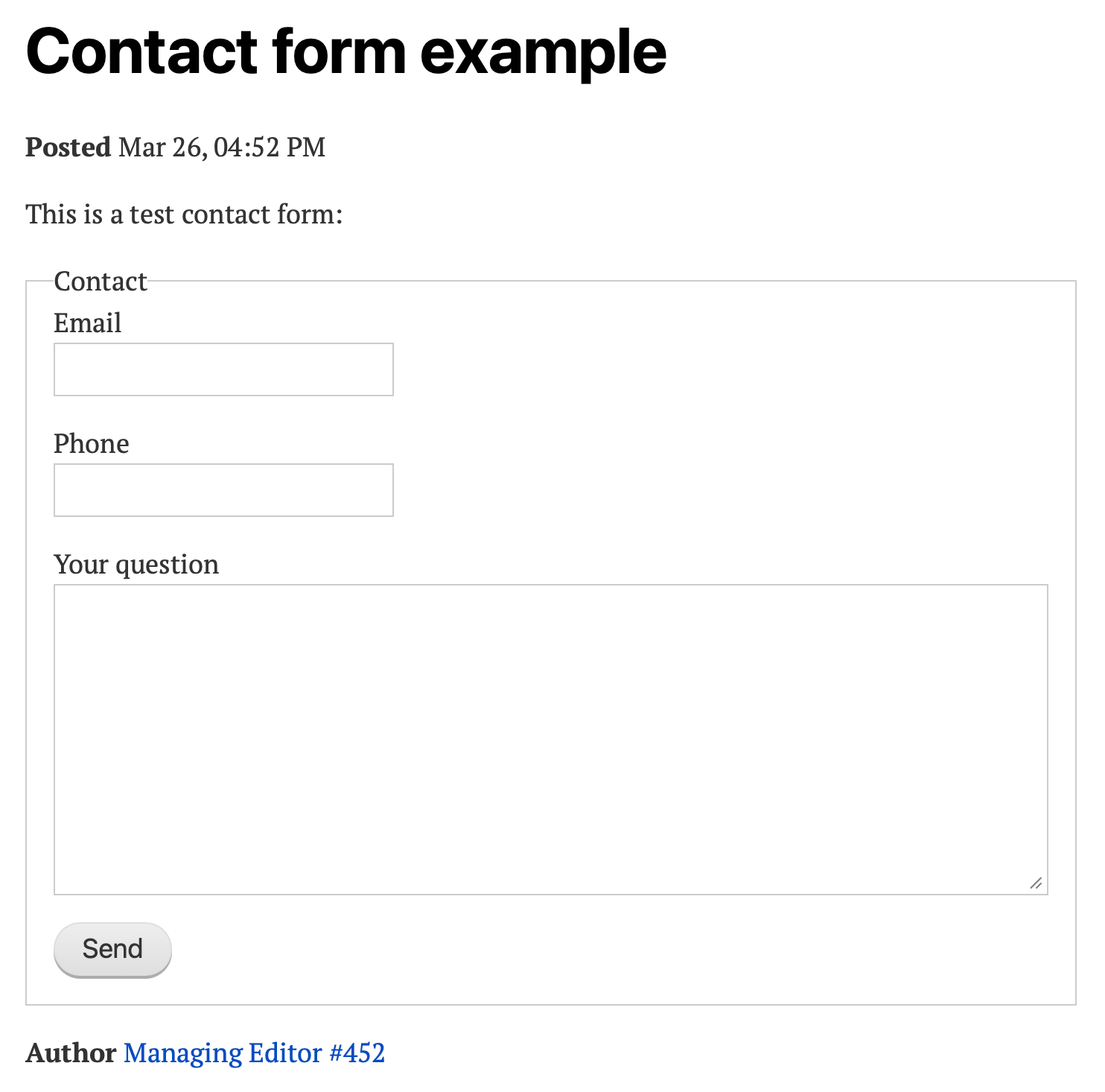
Obviously, you can go much further here with form styling or markup. Kevin Powell has a nice video on Form Styling Essentials (YouTube) by way of example.
bici wrote #343013:
The simplest form is shown below:...that last line doesn’t work for me––but this does :
<txp:output_form form="contact_form" />...
This depends on what you have in your contact_form. This combination works:
<txp:com_connect to="recipient@example.com" form="my-contact-form" />when my-contact-form contains:
<txp:com_connect_email />
<txp:com_connect_text label="Phone" min="7" max="15" />
<txp:com_connect_textarea label="Your question" />
<txp:com_connect_submit label="Send" />
Note there is no wrapping com_connect tag in the form here, just what is inside … i.e. the tags that output the forms and labels. Using txp:output_form with this won’t work because you would have no wrapping html form and no specified email recipient.
If, on the other hand, you’ve placed the entire block of code above including the wrapping com_connect tag in a contact_form form, then calling the entire block with output_form works. That’s just normal txp output.
You will need to test sending with your host. The email it sends from is what you have in your settings under Admin. Some hosts have stricter requirements, especially nowadays, others will happily send if the email is valid. Ask here again if you have no luck.
Spam protection methods vary. The honeypot method using pap_contact_cleaner is rather basic and works only for the simplest method. The newer method using delay works better in my view. See the 4.9 instructions for more details.
Contact forms come in so many different shapes and sizes that there is no single simple tutorial. But, like you suggested, it would be good to have one or two examples on textpattern.tips.
TXP Builders – finely-crafted code, design and txp
Offline
#517 2026-03-26 19:05:15
- uli
- Moderator

- From: Cologne
- Registered: 2006-08-15
- Posts: 4,334
Re: com_connect - form and contact mailer
I’ve derived two new com_connect web forms from an older one that can send on the same website I’m now working on. The newer forms can’t send, though. The error I keep getting is
Leider kann keine E-Mail gesendet werden.
… which translates to “Unfortunately, the email cannot be sent.” (It’s probably not the literal string but for whatever reason I have two German ones for the DB string named com_connect_mail_sorry.)
The forms all have different random looking IDs, so this should not be the reason.
I’m completely lost. What can I do? How can I debug this?
Last edited by uli (2026-03-26 19:13:35)
In bad weather I never leave home without wet_plugout, smd_where_used and adi_form_links
Offline
#518 2026-03-26 19:21:26
Re: com_connect - form and contact mailer
@uli, do you have any spam or filtering plugins working together with com_connect? It looks like that is the situation that triggers com_connect_mail_sorry.
TXP Builders – finely-crafted code, design and txp
Offline
#519 2026-03-26 19:25:53
Re: com_connect - form and contact mailer
Walter, here’s a basic proof of concept with some styling:
Use this tag to call your contact form:
<txp:com_connect to="bici@yoursite.com" form="contact_form" label="Get in touch" />and this as contact_form of type misc:
<div class="form-group">
    <txp:com_connect_text label="Full Name" break="" />
</div>

<div class="form-group">
    <txp:com_connect_text label="Company Name" break="" />
</div>

<div class="form-group">
    <txp:com_connect_email break="" />
</div>

<div class="form-group">
    <txp:com_connect_text label="Phone" min="7" max="15" break="" />
</div>

<div class="form-group">
    <txp:com_connect_textarea label="Your message" break="" />
</div>

<div class="form-group">
    <txp:com_connect_checkbox name="privacy" label="I agree that my personal data will be processed in accordance with the privacy policy" break="" />
</div>

<txp:com_connect_submit>Send Message</txp:com_connect_submit>
and this by way of example for your styles:
input,
button,
select,
textarea {
  font: inherit;
}

.comConnectForm fieldset {
  display: grid;
  gap: 1rem;
  margin-block: 2rem;
  padding: 0;
  border: none;
}

.comConnectForm legend {
  font-weight: bold;
  margin-block-end: 1rem;
}

.form-group {
  display: grid;
  gap: var(--com-label-offset);
}

label:not(.comCheckbox) {
  font-size: var(--com-label-font-size);
  font-weight: var(--com-label-clr-font-weight);
  color: var(--com-label-clr-text);

  text-box-trim: trim-both;
  text-box-edge: cap alphabetic;
}

input:is(.comText, .comEmail),
textarea.comTextarea {
  width: 100%;
  padding: var(--com-formfield-padding);
  background: var(--com-formfield-clr-bg);
  color: var(--com-formfield-clr-text);
  border: var(--com-formfield-border);
  border-radius: var(--com-formfield-border-radius);
}

input:is(.comText, .comEmail):focus,
textarea.comTextarea:focus {
  border: var(--com-formfield-border-active);
}

.form-group:has(.comCheckbox) {
  display: flex;
  gap: 1ch;
  align-items: center;
}

.comCheckbox {
  font-size: 0.925rem;
}

.comSubmit {
  cursor: pointer;
  background-color: var(--com-button-clr-bg);
  color: var(--com-button-clr-text);
  padding: .375rem 1.5rem;
  height: unset;
  border: 0;
  border-radius: var(--com-formfield-border-radius);
  justify-self: start;
}

.comSubmit:hover,
.comSubmit:focus-visible {
    background-color: var(--com-button-clr-active);
}


/* form styling */
:root {
  /* Adjust your CSS variables here */

  /* form field */
  --com-formfield-clr-bg: #f6f6f6;
  --com-formfield-clr-text: #222;
  --com-formfield-padding: 1rem .75rem;
  --com-formfield-border: 1.5px solid #ccc;
  --com-formfield-border-active: 1.5px solid #468adc;
  --com-formfield-border-radius: .25em;

  /* label */
  --com-label-clr-text: #000;
  --com-label-clr-font-weight: bold;
  --com-label-clr-required: red;
  --com-label-font-size: .875rem;
  --com-label-offset: .5rem;

  /* button */
  --com-button-clr-bg: #468adc;
  --com-button-clr-text: #fff;
  --com-button-clr-active: #0B6adc;
}
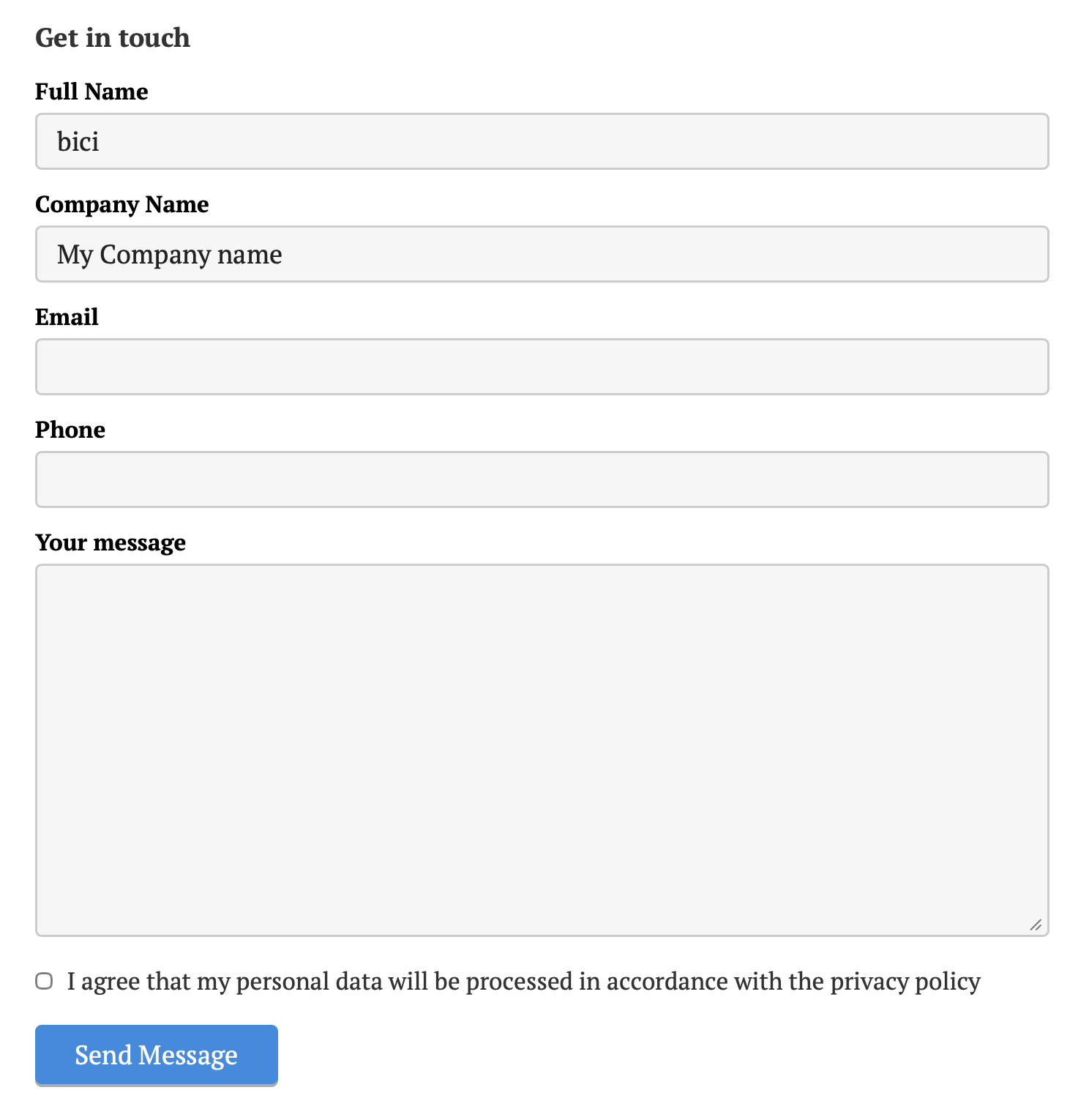
This is roughly a translation of Kevin Powell’s principle to Textpattern’s standard class names. At the bottom there is a series of CSS variables that you can use to adjust padding, styling, border colors etc.
This results in the following on a standard installation:
TXP Builders – finely-crafted code, design and txp
Offline
#520 2026-03-26 19:33:37
- uli
- Moderator
- From: Cologne
- Registered: 2006-08-15
- Posts: 4,334
Re: com_connect - form and contact mailer
jakob wrote #343016:
spam or filtering plugins working together with com_connect
You mean txp plugins, right, not browser plugins? I can’t imagine, pap_cleaner is built in, iirc. Do you have an example?
EDIT: The old/original webform can send. Shouldn’t it refuse, too?
Last edited by uli (2026-03-26 19:43:51)
In bad weather I never leave home without wet_plugout, smd_where_used and adi_form_links
Offline
#521 2026-03-26 19:53:49
Re: com_connect - form and contact mailer
uli wrote #343018:
I can’t imagine, pap_cleaner is built in
It is, in com_connect 4.9.0. Well, the same capability is. The examples explain more but here’s a quick one:
<txp:com_connect_text hidden label="" name="home_phone" required="0" />
<txp:com_connect_expect name="home_phone" />
Add that inside your com_connect tag and it behaves identically to pap_contact_cleaner. If a bot fills in the hidden field, you’re telling it you expect no value (i.e. not to be completed) and that will trigger a spam fail.
You can even go a bit further and add a delay attribute so the field only appears after a certain time, but that’s not much use in this simple situation because you want the field to be available immediately so bots are tricked into filling it in.
The delay is more useful if you want to add hidden fields that you require to be submitted. Any bots that fill your forms in faster than the delay (in seconds) will trigger the spam fail
The smd plugin menagerie — for when you need one more gribble of power from Textpattern. Bleeding-edge code available on GitHub.
Hire Txp Builders – finely-crafted code, design and Txp
Offline
#522 2026-03-26 21:21:15
Re: com_connect - form and contact mailer
jakob wrote #343014:
Hi Walter. In its simplest form that should work as you showed:
- Make sure you have the most recent version of the plugin from the releases page on GitHub if you are on Textpattern 4.9
- Grab com_connect_v4.9.0.txt from that page.
- Copy the plugin and install on your site.
- Make sure you have activated it.
I tried the first snippet you showed above on the demo site and it worked immediately. The styling is still quite basic but it is a starting point. It adds a
brbetween the label and input as standard, but if you add
.comConnectForm input,...you already get passable output.
Obviously, you can go much further here with form styling or markup. Kevin Powell has a nice video on Form Styling Essentials (YouTube) by way of example.
This depends on what you have in your
contact_form. This combination works:
<txp:com_connect to="recipientexample.com” form=“my-contact-form” />…@when
my-contact-formcontains:
<txp:com_connect_email />...Note there is no wrapping
com_connecttag in the form here, just what is inside … i.e. the tags that output the forms and labels. Using txp:output_form with this won’t work because you would have no wrapping html form and no specified email recipient.If, on the other hand, you’ve placed the entire block of code above including the wrapping com_connect tag in a contact_form form, then calling the entire block with output_form works. That’s just normal txp output.
You will need to test sending with your host. The email it sends from is what you have in your settings under Admin. Some hosts have stricter requirements, especially nowadays, others will happily send if the email is valid. Ask here again if you have no luck.
Spam protection methods vary. The honeypot method using pap_contact_cleaner is rather basic and works only for the simplest method. The newer method using
delayworks better in my view. See the 4.9 instructions for more details.Contact forms come in so many different shapes and sizes that there is no single simple tutorial. But, like you suggested, it would be good to have one or two examples on textpattern.tips.
right … it does work when one eliminates that first line from the contact-form. ;-)
The documentation should be more clear on that point.
Last edited by bici (2026-03-26 21:21:41)
…. texted postive
Offline
#523 2026-03-26 21:27:05
Re: com_connect - form and contact mailer
jakob wrote #343017:
Walter, here’s a basic proof of concept with some styling:
Use this tag to call your contact form:
<txp:com_connect to="biciyoursite.com” form=“contact_form” label=“Get in touch” />…@and this as
contact_formof type misc:
<div class="form-group">...and this by way of example for your styles:
input,...This is roughly a translation of Kevin Powell’s principle to Textpattern’s standard class names. At the bottom there is a series of CSS variables that you can use to adjust padding, styling, border colors etc.
This results in the following on a standard installation:
perfect. works beautifully. Thank-you!
PS for anyone coming by here later on…. i added this to your example, in order to include the submit button :
<div class="form-group">
    <txp:com_connect_submit label="Send Message" />
</div>
Last edited by bici (2026-03-26 21:28:39)
…. texted postive
Offline
#524 2026-03-26 21:44:37
Re: com_connect - form and contact mailer
bici wrote #343021:
perfect. works beautifully. Thank-you!
PS for anyone coming by here later on…. i added this to your example, in order to include the submit button
FWIW, I didn’t wrap that in a form-group (although you can) because it doesn’t actually group anything. It only contains a single item. All the other cases group together a label and an input or textarea.
There is also a subtle difference in the tag usage, Using the tag as a container:
<txp:com_connect_submit>Send Message</txp:com_connect_submit>produces a button:
<button type="submit" class="comSubmit" name="com_connect_submit" value="Send" form="…">Send Message</button>whereas using the tag with a label:
<txp:com_connect_submit label="Send Message" />produces an input with type=“submit”
<input type="submit" class="comSubmit" name="com_connect_submit" value="Send Message" form="…">TXP Builders – finely-crafted code, design and txp
Offline
#525 2026-03-26 21:51:30
Re: com_connect - form and contact mailer
uli wrote #343018:
You mean txp plugins, right, not browser plugins? I can’t imagine, pap_cleaner is built in, iirc. Do you have an example?
EDIT: The old/original webform can send. Shouldn’t it refuse, too?
Yes, I meant a txp-plugin that works in conjunction with com_connect, like pap_cleaner. IIRC that needed changing to work with the 4.9 version, or maybe that was earlier. I’ve forgotten.
Looking more closely at the plugin code, that message seems to be what you get when a plugin doesn’t have a more specific message or when the deliver part of the plugin returns an error.
Can you try explicitly setting the from="email address" attribute in the com_connect tag? I’ve found some hosts are much stricter about allowing the address they will allow system mails to be sent from. Activating the “advanced mail settings” and providing the specific sending mail account details, either in the admin area or in config.php helped resolve it.
TXP Builders – finely-crafted code, design and txp
Offline