Textpattern CMS support forum
You are not logged in. Register | Login | Help
- Topics: Active | Unanswered

Overriding the thumbnail size for SVG images in admin side list
Technicals: Textpattern 4.9.1, all images managed by admin side are SVG with a native size of 24×24.
The thumbnail being used in the list is about 240×240, which adds a lot of space around the other table row contents and there’s lots of scrolling down the page. Like this:
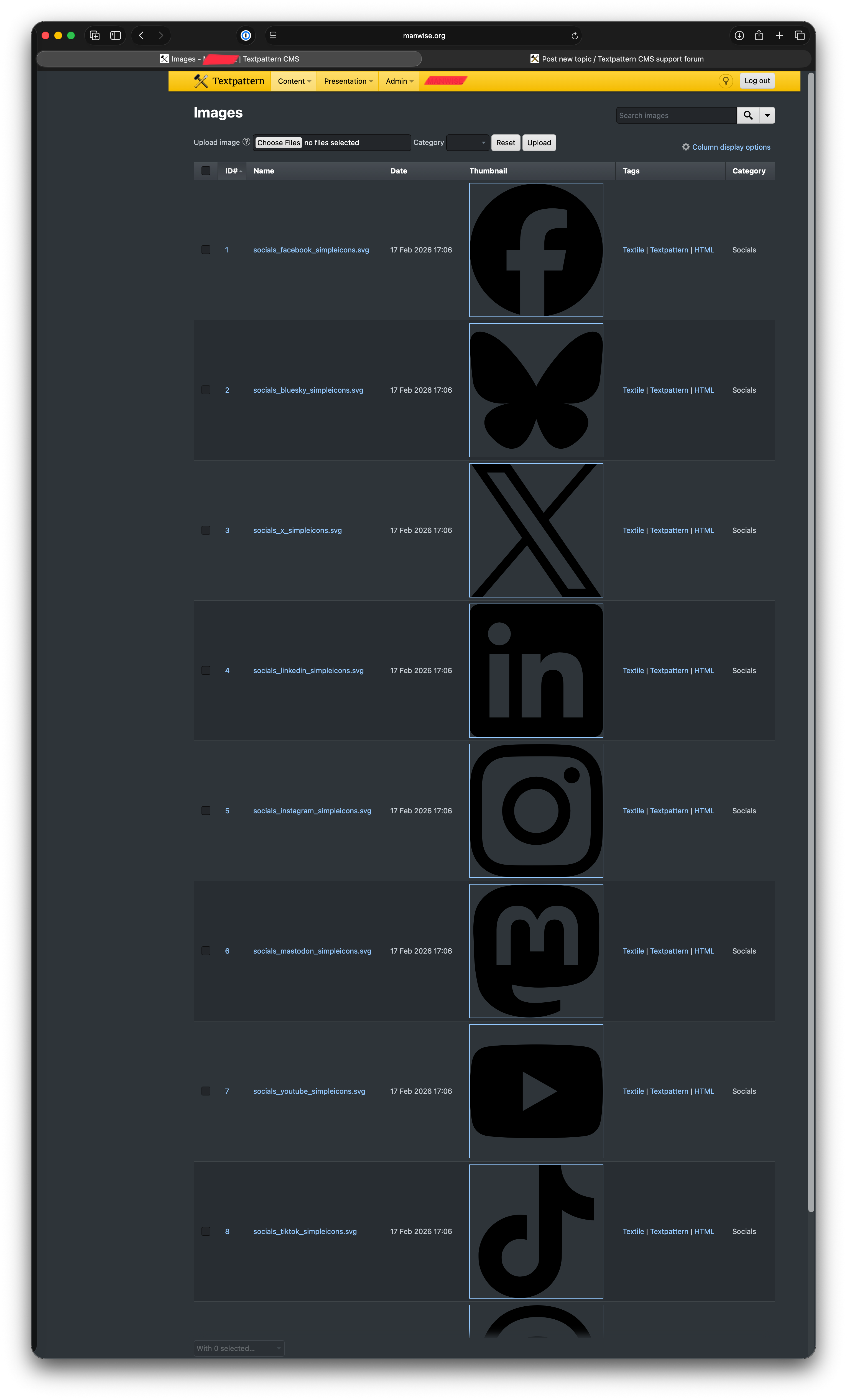
Is there a way to override the image thumbnail size in the images list? I understand there’s no thumbnail functionality in the SVG image panel itself, that makes sense.
Edit: I can disable the thumbnail column easily enough, but a quick reference thumbnail in a more size-appropriate way would be useful.
Advice and suggestions warmly welcomed. Thank you.
Last edited by gaekwad (2026-02-19 13:28:57)
Offline

Re: Overriding the thumbnail size for SVG images in admin side list
Hmmm yeah. Not sure how best to handle that, short of a separate image size value solely for SVGs.
There’s an argument that SVGs are for small graphics and icons, which probably does cover the majority of use cases. But I’m not sure I’d like to blindly assume that’s the case and treat them differently by default.
For example, some SVGs are fiendishly complex, where people use them to show off skills and stuff:
So, in summary, not sure. Does anyone have any cool ideas how we could sanely manage this? I guess a tiny weeny plugin that detects the file type and applies a fixed width would work. There’s a callback specifically for that situation.
The smd plugin menagerie — for when you need one more gribble of power from Textpattern. Bleeding-edge code available on GitHub.
Hire Txp Builders – finely-crafted code, design and Txp
Offline
Re: Overriding the thumbnail size for SVG images in admin side list
Bloke wrote #342680:
Not sure how best to handle that, short of a separate image size value solely for SVGs.
Thanks, Bloke – I appreciate your take on this. I’ll have a think on this – I can hide the thumbnail column easily enough for now.
Offline

Re: Overriding the thumbnail size for SVG images in admin side list
Two ideas:
1. If you assign your social-media icons to their own image category in textpattern, then you could add a custom.css to your admin theme and use CSS’s :has to make the thumbnail image for all images in that category display smaller. For example, say your category is called “icon”, you could do this:
.txp-list tr:has(.txp-list-col-category span[title="icon"]) .content-image {
    width: 48px;
    height: 48px;
}
(looks pretty horrible, I know) Check the admin source to get the right title attribute. It will match the image category name.
2. Another option would be to use a different approach for these small and relatively common icons, and reserve the images panel for svg graphics that are used as article content.
You can group common svg icons in an svg symbolset and then reference the icons within it as and when you need them. The browser will cache the symbolset on first load, so really it’s only a question of not going overboard with hundreds of icons (like fontawesome does).
A symbolset looks like this:
<svg xmlns="http://www.w3.org/2000/svg" xmlns:xlink="http://www.w3.org/1999/xlink" width="0" height="0" style="display:none;">
    <symbol viewBox="0 0 24 24" id="arrow-up">
        <path d="M13.0001 7.82843V20H11.0001V7.82843L5.63614 13.1924L4.22192 11.7782L12.0001 4L19.7783 11.7782L18.3641 13.1924L13.0001 7.82843Z"></path>
    </symbol>
    <symbol viewBox="0 0 24 24" id="arrow-down">
        <path d="M13.0001 16.1716L18.3641 10.8076L19.7783 12.2218L12.0001 20L4.22192 12.2218L5.63614 10.8076L11.0001 16.1716V4H13.0001V16.1716Z"></path>
    </symbol>
    <symbol viewBox="0 0 24 24" id="arrow-left">
        <path d="M7.82843 10.9999H20V12.9999H7.82843L13.1924 18.3638L11.7782 19.778L4 11.9999L11.7782 4.22168L13.1924 5.63589L7.82 10.9999Z"></path>
    </symbol>
    …
</svg>
You could save that in your assets folder as site-icons.svg and use it like this in your code:
<!-- #arrow-up refers to the id in the symbolset -->
<svg class="icon" aria-hidden="true">
    <use href="/path/to/your/assets/site-icons.svg#arrow-up"></use>
</svg>
You can make this little codesnippet into a <txp::icon icon="arrow-up" /> shortcode for quicker use and expand on it if you need special situations (e.g. alignment classes or icon size overrides) or want it to announce its purpose to screen readers.
If you misuse the sort order column of Textpattern’s links, you can put the id value of the icon in there (or use my jcr_link_custom plugin) and output your social media links directly from the links panel.
Some icon producers will automatically make symbolsets for you, but they’re easy enough to make by hand too.
TXP Builders – finely-crafted code, design and txp
Offline
Re: Overriding the thumbnail size for SVG images in admin side list
That’s a neat idea about the category and CSS. How about, if the category is set, I add that as a classname to the thumbnail column cell? And any unassigned category gets, I dunno, txp_no_category? Would that make the selector any saner?
Any other thoughts on this approach? Would it be better to apply the class to the row <tr> instead?
The smd plugin menagerie — for when you need one more gribble of power from Textpattern. Bleeding-edge code available on GitHub.
Hire Txp Builders – finely-crafted code, design and Txp
Offline
Re: Overriding the thumbnail size for SVG images in admin side list
That would make it easier, yes. In general, the admin side could have a few more specific class hooks, and I’m sure Philippe and Gary have more detailed opinions about that.
TXP Builders – finely-crafted code, design and txp
Offline
Re: Overriding the thumbnail size for SVG images in admin side list
Cool. If we can improve the somewhat sporadic and opinionated or not-so-helpful class names that have accumulated over time, now’s an ideal opportunity to rationalise them, make them more consistent, and more useful.
If someone wants to start a thread or open an issue to keep it on our radar, we can look at it as we iterate the markup for Txp 5.0.0.
The smd plugin menagerie — for when you need one more gribble of power from Textpattern. Bleeding-edge code available on GitHub.
Hire Txp Builders – finely-crafted code, design and Txp
Offline
Re: Overriding the thumbnail size for SVG images in admin side list
jakob wrote #342684:
Two ideas:
Thank you, jakob – your reply was really helpful – much appreciated!
Offline
Re: Overriding the thumbnail size for SVG images in admin side list
jakob wrote #342684:
A symbolset looks like this:
I have come back to this a few times over the last hours, and it’s been the inspiration behind my solution. The penny dropped when I realised the text chunks would be trivially small to manage – and not really appropriate for the image tab in the traditional sense. I’ll admit I’ve only done manual image management prior to this site, and I was trying to embrace the internal management route, but I don’t think my use case is a good jumping off point.
I was considering a modular approach to having dark & light themes, with icons styled accordingly – and I’ve decided split the path code block to a misc form for each icon. I can then customise the svg container with class and viewbox tweaks per instance on the page.
It’s an extra database query initially, but it sidesteps the numerous file access requests to individual (and frankly trivially-sized) image files.
Thanks again, jakob!
Offline
Re: Overriding the thumbnail size for SVG images in admin side list
If I understand you correctly, you’re not using symbolsets but simply embedding the source of the svg from a corresponding txp form as you need it? Sure, that works too, especially if you don’t have a large number of icons.
On the dark/light front: if your icons don’t have complex requirements for what needs to be different in light and dark modes and your svg doesn’t hard code a color, you should be able to use the CSS directive fill: to change the icon color. You can also use the fill="currentColor" keyword (analogue for stroke) and the svg should inherit the color from the surrounding text. It can sometimes depend on how an individual svg is drawn, but most well-drawn monochrome icons should work. That may obviate the need for different svgs altogether.
You can expand on that using css custom properties (aka --css-variables) inside your svg’s fill and stroke, and then change the variable colour depending on the situation via css. An example: I had a site with a logo comprising an umbrella and the name of the organisation. The handle and tip of the umbrella have an accent colour, the umbrella itself another colour. The logo is used against a white background, against a dark blue background and occasionally also against a light pink background. In each case the combination of colours shifts accordingly. Setting css variables for --clr-logo-name, --clr-logo-umbrella, --clr-logo-accent inside the svg means you just change the variable values depending on the background they appear against and need just one svg rather than three variants.
/* standard (white background) */
.site-logo {
    --clr-logo-name: darkblue;
    --clr-logo-umbrella: lightblue;
    --clr-logo-accent: crimson;
    /* rest of your css */
}

.section-dark {
    background-color: darkblue;

    .site-logo {
        --clr-logo-name: white;
    }
}

.section-tint {
    background-color: lightpink;

    .site-logo {
        --clr-logo-name: darkblue;
        --clr-logo-umbrella: white;
    }
}
TXP Builders – finely-crafted code, design and txp
Offline
Re: Overriding the thumbnail size for SVG images in admin side list
jakob wrote #342709:
If I understand you correctly, you’re not using symbolsets but simply embedding the source of the svg from a corresponding txp form as you need it? Sure, that works too, especially if you don’t have a large number of icons.
Correct. On further examination, they’re really quite simple vectors and are trivial to inline with a form at this stage. When I’m using more of them actively, I’ll build a symbolset as you (very clearly) explained, but for now I’ll stick to a form. I haven’t weighed up the database I/O vs the file open I/O for a 450 byte SVG path string, but if that becomes necessary I’ll figure that out.
On the dark/light front: if your icons don’t have complex requirements for what needs to be different in light and dark modes and your svg doesn’t hard code a color, you should be able to use the CSS directive
fill:to change the icon color. You can also use thefill="currentColor"keyword (analogue forstroke) and the svg should inherit the color from the surrounding text. It can sometimes depend on how an individual svg is drawn, but most well-drawn monochrome icons should work. That may obviate the need for different svgs altogether.
Thank you. I’ve also split the svg wrapper apart so I can use Tailwind class stuff per viewport size, so there’s extra utility there.
You can expand on that using css custom properties (aka --css-variables) inside your svg’s fill and stroke, and then change the variable colour depending on the situation via css.
Thank you – this is on the cards for v2…I’m very, very out of practice with site building for various reasons (the main one will become more clear when I do the big reveal for this site), so I’m relearning to walk before I jog.
Offline
Re: Overriding the thumbnail size for SVG images in admin side list
Bloke wrote #342685:
That’s a neat idea about the category and CSS. How about, if the category is set, I add that as a classname to the thumbnail column cell? And any unassigned category gets, I dunno,
txp_no_category? Would that make the selector any saner?
Not sure why that span in <span title="category-name">category-name</span> exists, apart from adding some noise, to be honest. Removing the span and just inserting “category-name@” string as child of the td would be enough. The idea of adding that “category-name@” string as a class on the td containing the thumbnail image might be useful though.
Last edited by phiw13 (2026-02-20 05:14:13)
In low-power mode.
Sand space – admin theme for Textpattern
phiw13 on Codeberg
Offline
Re: Overriding the thumbnail size for SVG images in admin side list
phiw13 wrote #342715:
Not sure why that
spanin<span title="category-name">category-name</span>exists …Removing the span and just inserting “category-name@” string as child of the td would be enough.
Me neither, but removing it would stop the selector combination above from working. For that it was useful.
The idea of adding that “category-name@” string as a
classon thetdcontaining the thumbnail image might be useful though.
… would make it possible again via another selector.
TXP Builders – finely-crafted code, design and txp
Offline
Re: Overriding the thumbnail size for SVG images in admin side list
jakob wrote #342717:
Me neither, but removing it would stop the selector combination above from working. For that it was useful.
Sure, yeah.
When I see that sort of HTML structure, I think of the screen reader user who will (possibly) hear “category-name category-name”, which is 100% certified noise.
Note: possibly… mercifully, many screen reader users turn OFF broadcasting of the title attribute due to widespread misuse, SEO I am looking at your.
In low-power mode.
Sand space – admin theme for Textpattern
phiw13 on Codeberg
Offline
Re: Overriding the thumbnail size for SVG images in admin side list
Noted. In general then, are we saying that the html title attribute is rather useless and we should phase it out admin-side? Or does it occasionally have its place?
The smd plugin menagerie — for when you need one more gribble of power from Textpattern. Bleeding-edge code available on GitHub.
Hire Txp Builders – finely-crafted code, design and Txp
Offline