Textpattern CMS support forum
You are not logged in. Register | Login | Help
- Topics: Active | Unanswered

all_pic: Find, add and arrange images in the Write tab
- In the
Writepanel, find and add images to theArticle Imagefield or any specifiedcustom field. - The default
Imagespanel opens in a SideView, providing full upload, edit and search capabilities. - Build gallery
shortcodes for insertion into any textarea. - Thumbnails can be rearranged and moved to other groups via dragging.
- Thumbnails adjust their size according to the number of their siblings.
I regularly use more than the Article image field to specify images in my projects, and displaying preview thumbs for each field is helpful for content editors (particularly the more visually-oriented ones). Large gallery <txp::shortcodes /> for displaying images in the body field often require fiddly edits to the order of the specified ids, each requiring a ‘Save’ and then a subsequent ‘View’ or reload of the public page.
all_pic helps alleviate these issues.
The plugin defers the search and selection of images to the familiar Images tab, and displays thumbnail galleries for each grouping in the Write tab. Thumbnails can be reordered within a group (including shortcode previews), or be dragged to another group altogether.
Find all_pic.zip (v0.1beta) and a full overview on GitHub.
Offline

Re: all_pic: Find, add and arrange images in the Write tab
Crikey, you have been busy! I’ll check this out, thank you. I’m building a site for someone right now that needs slick image handling.
The smd plugin menagerie — for when you need one more gribble of power from Textpattern. Bleeding-edge code available on GitHub.
Txp Builders – finely-crafted code, design and Txp
Offline

Re: all_pic: Find, add and arrange images in the Write tab
Cool! I’m pushed for time right now but will give it a roll soon.
TXP Builders – finely-crafted code, design and txp
Offline
Re: all_pic: Find, add and arrange images in the Write tab
I’m about to trial it on the Artedomus website, where a couple of content editors pimp images en-masse regularly in their articles (typical article).
Both all_pic and all_sideview came about through a request to see what I could do about improving staff workflow / making the interface more ‘visual’.
I have further plans to incorporate mini-short code galleries alongside their shortcode counterparts in the body field, but this may be asking too much…
Offline
#5 2025-12-20 23:55:37
- bashirnoori
- Member

- From: Afghanistan
- Registered: 2012-10-02
- Posts: 86
Re: all_pic: Find, add and arrange images in the Write tab
Great Job !
I noticed this plugin that improves image handling in the Write article tab, and it looks very promising.
I hope this plugin can be further improved, or that similar functionality could be considered for the Textpattern core. Ideally, it would allow users to easily search existing images or upload new ones directly while writing an article.
When I train clients to manage their websites, image management during article writing is one of the most common questions. Many users are used to the simplicity of WordPress media, where adding images to a post is very straightforward.
Improving this area would greatly help usability, especially for non-technical users.
Offline
Re: all_pic: Find, add and arrange images in the Write tab
bashirnoori wrote #341871:
Ideally, it would allow users to easily search existing images or upload new ones directly while writing an article.
Not to detract from giz’s excellent work on taking image handling to the next level, but the com_article_image plugin does most of what you ask already, in some form or another:
- Drag image(s) from computer or the web browser to the article image field to attach them when article saved (or browse for them on your device).
- Rearrange (drag n drop) image order (or swap ID list order by hand).
- Delete image(s) from article image set.
- Search for images already uploaded and click to attach either individual images or all images (after removing ones you don’t want) to the article.
- Search for images that don’t match your term, and attach them as above.
- Drag images to body/excerpt to upload and insert as a (custom-defined) tag or shortcode.
- Image search can be performed on any nominated field (id, name, alt, caption, …).
The smd plugin menagerie — for when you need one more gribble of power from Textpattern. Bleeding-edge code available on GitHub.
Txp Builders – finely-crafted code, design and Txp
Offline
Re: all_pic: Find, add and arrange images in the Write tab
bashirnoori wrote #341871:
Great Job !
Thanks, Bashir.
Watch this space. I’m currently finalising an update to the plugin that includes:
- preview galleries for any shortcode within the body field
- drag and drop a thumb from the source list to any gallery
- new layout for the source list so more thumbs are visible without scrolling.
Offline
Re: all_pic: Find, add and arrange images in the Write tab
all_pic has been used intensively by staff-writers for a few months now; no complaints :)
I spent many hours converting a few hundred <txp:images id="a shitload of ids" form="images" etc /> snippets into <txp::gallery id="a shitload of ids" />. Tedious, but it ultimately resulted in improvements to all_pic:
- An answer to ‘how can I see what these shortcodes represent?’
- Adding the ability to drag an image from the SideView iframe into the parent document
- Optimising SideView so that more thumbs are visible with less scrolling

I couldn’t get the zip installer to work (zip -r all_pic.zip . -x '.*' -x '__MACOSX', no resource forks but 4.9-dev complains about a malformed plugin), so an old-school manual install into plugins/ is required.
Offline

Re: all_pic: Find, add and arrange images in the Write tab
giz wrote #341954:
all_pic has been used intensively by staff-writers for a few months now; no complaints :)
- An answer to ‘how can I see what these shortcodes represent?’
- Adding the ability to drag an image from the SideView iframe into the parent document
- Optimising SideView so that more thumbs are visible with less scrolling
I couldn’t get the zip installer to work (
zip -r all_pic.zip . -x '.*' -x '__MACOSX', no resource forks but 4.9-dev complains about a malformed plugin), so an old-school manual install into plugins/ is required.
the Folder all_pic-main contains a number of files :
textpack.txp
README.md
README.html
manifest.json
help.textile
help.html
allPic.webp
all_pic.scss
all_pic.php
all_pic.js
all_pic.css
.gitignore
.gitattributes
how/what do we install? I zipped the folder but TxP Plugin installer didn’t like it.
…. texted postive
Offline
#10 Today 07:05:43

Re: all_pic: Find, add and arrange images in the Write tab
giz wrote #341954:
I couldn’t get the zip installer to work (
zip -r all_pic.zip . -x '.*' -x '__MACOSX', no resource forks but 4.9-dev complains about a malformed plugin), so an old-school manual install into plugins/ is required.
Similar issues happened to me back then. But it went well in the end, thanks to this script-fu. HTH.
Offline
#11 Today 13:18:21
Re: all_pic: Find, add and arrange images in the Write tab
wet’s solution is (I believe) windows only.
On the mac I have an automator action to do this, and it worked with a slightly cleaned up version of your folder. In automator (which comes with macOS), create a new automator action, choose “application” as type, then search for “shell script” and add that action. Enter the following in the text field:
while read -r p; do
zip -d "$p" __MACOSX/\* || true
zip -d "$p" \*/.DS_Store || true
done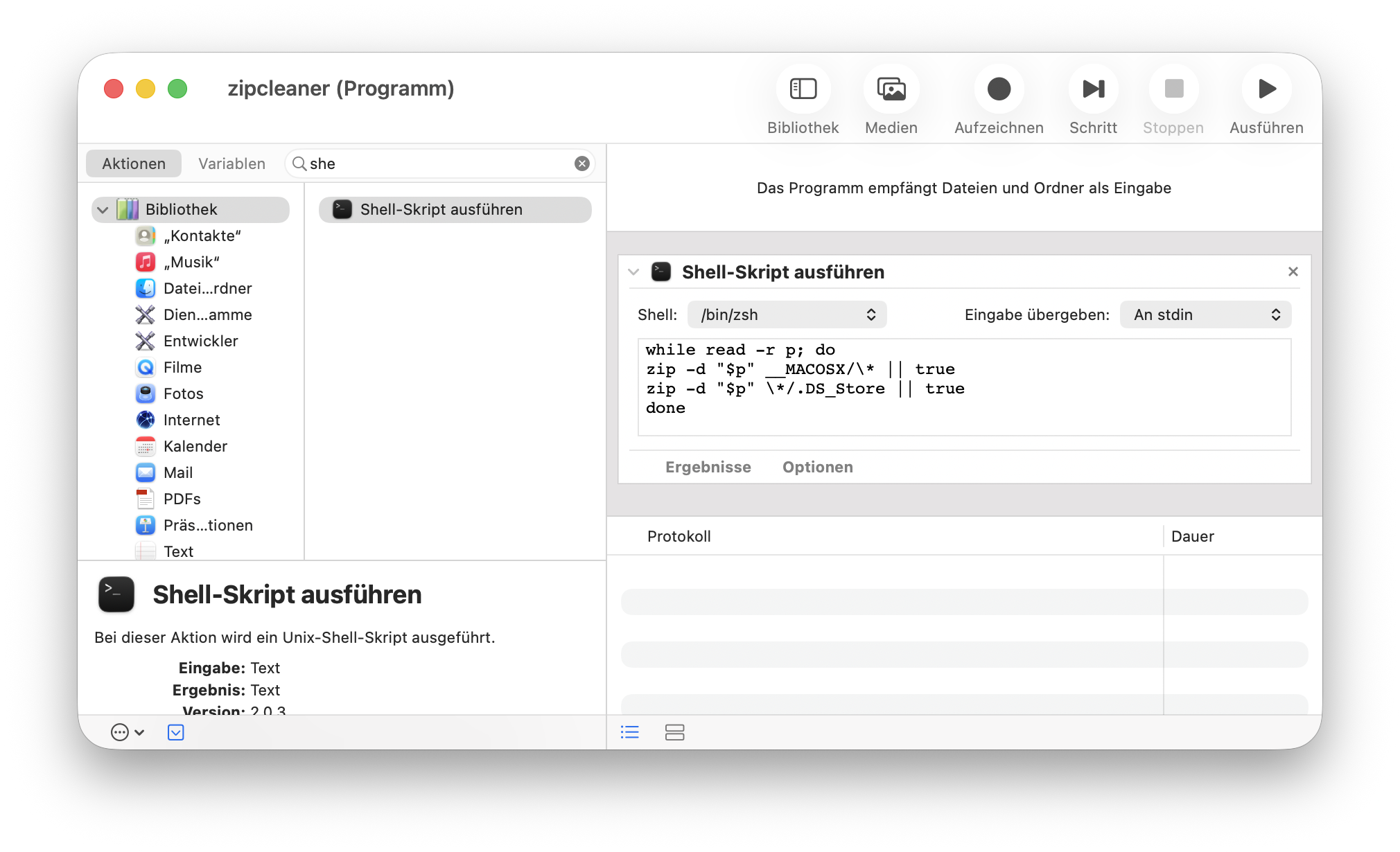
Then choose “Save…”, give your app a name and save it somewhere handy, like your desktop. Make sure you have “application” as the chosen type in the save dialog and you’ll get a ready-to-use standalone app that performs the action.
Tip 1: You can change its icon by opening the app properties in the finder and dropping an icon of your own into the icon in the top-left corner of the properties window.
Tip 2: You can additionally or alternatively make this into a finder action rather than a standalone app.
I use this in general to clean zips I send via mail so that windows users don’t end up with the mac resource fork.
General usage:
- Use the regular finder zip / compress option to create your zip as usual.
- Drop that zip on your newly-made app to clean it.
For all_pic, I …
- downloaded the
all_pic-mainfolder from the git repo, removed the .gitignore, .gitattributes, readme docs, scss, webp and help.html files. Command + Shift + dot toggles hidden files in the finder. - renamed the folder all_pic, then used the finder compress / zip command (right-click on folder)
- dropped the resulting zip on the zipcleaner app
The result you can download here
TXP Builders – finely-crafted code, design and txp
Offline
#12 Today 13:54:04
Re: all_pic: Find, add and arrange images in the Write tab
jakob wrote #341959:
wet’s solution is (I believe) windows only.
True, the script is Windows-only.
But: The relevant part of this repo is IMHO the attempted documentation of the plugin’s ZIP file layout Textpattern expects1.
Any developer capable of writing a Textpattern plugin would probably be able to incorporate this into her preferred scripting and zipping toolchain.
1 The powers that be might want to steal this findings, adapt to reality, and engrave them somewhere over there.
Offline