Textpattern CMS support forum
You are not logged in. Register | Login | Help
- Topics: Active | Unanswered
Re: Images and the file system layout from 4.9.0
Bloke wrote #329513:
One thing we could consider is to use the id split up. So, I dunno…
/public/images/1/23/123.jpg
/public/images/1/23/1230.jpg
I’m not really fond of it, since its logic is artificial. But what’s wrong with date-based directories? How many images a person could upload per day?
Offline

Re: Images and the file system layout from 4.9.0
Vienuolis wrote #329512:
I see only one robust image filenaming method: by adding a volatile image filename as an alias to its stable canonical ID — leaving and not renaming it.
This has merit. We can use server rules to skip the name (maniqui did this back in the day) but we need to consider Nginx too.
Any ideas on how to implement it at a tech file system php level, gratefully appreciated.
The smd plugin menagerie — for when you need one more gribble of power from Textpattern. Bleeding-edge code available on GitHub.
Hire Txp Builders – finely-crafted code, design and Txp
Offline
Re: Images and the file system layout from 4.9.0
etc wrote #329514:
I’m not really fond of it, since its logic is artificial.
Me neither.
what’s wrong with date-based directories? How many images a person could upload per day?
Nothing. It’s not a question of volume. It’s being able to find the damn images in five years when you need to move some around. Or if you want to manually intervene and replace a few.
And how, programmatically, do we find the image? If we use the upload datestamp (aka ‘now’) and stash that in the database metadata so we can find the image, I guess that’s fine. But you still need to look up the date stored to find the file. With the id (or potentially its name) it’s atomic. If you know the id you can find where it lives without the database.
If we use the image’s datestamp, that might help if people are really good at organising their pics using (e.g) exif or iptc metadata or are good at housekeeping images filed logically. Not so good for casual photos from a phone.
Plus if you later replace an image and the new one has a different date stamp, do we move the image to a new subdir to reflect its new stamp? Thus breaking direct URLs. Or leave it in its original location so the datestamp of the yyyy/mm/dd subdir doesn’t match the files it contains?
I’m not married to any system. I’m trying to use this discussion to find the best way to store images so:
- humans can easily find them if necessary.
- the system can find them with minimal extra hoops/info.
- the system scales and is reasonably well distributed so the number of files per dir remains manageable as the number of images grows.
- files that are related – usually those of different sizes – are close together so they can be easily operated upon by hand (e.g. if you want to replace a bunch with your own versions via FTP, it should be easy to do so).
- it’s performant.
Lots to balance. There’s no perfect solution. Just need the best compromise for all of the above.
The smd plugin menagerie — for when you need one more gribble of power from Textpattern. Bleeding-edge code available on GitHub.
Hire Txp Builders – finely-crafted code, design and Txp
Offline

Re: Images and the file system layout from 4.9.0
Bloke wrote #329516:
- files that are related – usually those of different sizes – are close together so they can be easily operated upon by hand (e.g. if you want to replace a bunch with your own versions via FTP, it should be easy to do so).
Does this mean that the buttons to replace the thumbs (Browse, Reset, Upload) will be removed?
Last edited by colak (2021-03-27 17:52:05)
Yiannis
——————————
NeMe | hblack.art | EMAP | A Sea change | Toolkit of Care
I do my best editing after I click on the submit button.
Offline
Re: Images and the file system layout from 4.9.0
colak wrote #329528:
Does this mean that the buttons to replace the thumbs (Browse, Reset, Upload) will be removed?
Yes. Well, probably. Because it makes better use of screen real estate with an unknown number of thumbs if you have a dropdown of all available sizes for the current image. Pick one, it’s loaded in and you can operate on just that thumb.
- If you use the upload/replace tool on a thumb, then just that thumb is replaced.
- If you select the working copy (aka main) image then I was thinking you’d get an additional checkbox when you replace it, to offer the option to “recreate all sizes on upload?”
- If you select the original size image from the dropdown and choose to replace that, all images in the set will be recreated automatically because that’s the controlling picture for this ID. So if you donkey with that, you are doing it for a very good reason. A warning that appears alongside the upload box could help make this clear.
One thing I haven’t figured out yet is whether to allow cropping and color correction tools on individual images. Part of me says why not. You might have a massive picture at full res and want to zoom in on a portion of it for the smaller image so the subject isn’t too tiny when shrunk – think art direction.
You’d have to have some way to apply the changes to just that image. That’s easy: an Apply button. Incidentally, we’re planning to offer undo states. I’ve mostly figured that out.
But another part of me thinks that if you want to do art direction in a <picture> tag then you could just upload a second image (different id) and switch to it at whatever res you want in your tag.
That means you can only operate (crop/rotate/colorize/etc) on the working (main) image and the tools are hidden when you select other sizes. And a checkbox near the Apply button could allow you to push the artistic changes to all other thumbs. Or maybe to a chosen subset of thumbs in case you’ve manually replaced one and want it to be skipped.
I don’t want to offer the kitchen sink here. People who take this seriously will likely pre-process their images offline anyway and upload the various sizes by hand, either via FTP or through the interface via the upload/replace tool on the Image Edit panel. But it’d be nice to offer rudimentary control to admins to perform oft-used tools to tinker with the image. If we restrict that to the main image for simplicity and force your thumbs to always remain in sync with it, then I’m fine with that.
That was my thinking anyway. If anyone has better ideas, please speak up.
The smd plugin menagerie — for when you need one more gribble of power from Textpattern. Bleeding-edge code available on GitHub.
Hire Txp Builders – finely-crafted code, design and Txp
Offline
Re: Images and the file system layout from 4.9.0
Bloke wrote #329516:
It’s not a question of volume.
Ah, ok, then I have misunderstood the issue, never had to deal with an image-intensive site.
And how, programmatically, do we find the image? … With the id (or potentially its name) it’s atomic. If you know the id you can find where it lives without the database.
Do we often need to retrieve only image URL? Generally, images are output through <txp:images /> tag, and the latter queries db anyway to retrieve the author, the description and so on.
Offline
Re: Images and the file system layout from 4.9.0
etc wrote #329531:
Do we often need to retrieve only image URL?
For the front-end, you’re right that most access is through tags. But the admin-side relies (and will rely moreso in 4.9) on fast access to the images – either URL or path – so we can switch image from the UI and operate on them. During the act of operating on the files, we’ll create temp images and then write those back to replace the old version when Apply is tapped.
It’s not too much hardship on the Image Edit panel to look up the images and metadata (on page load, as normal) and return all their paths, then stuff those in some JS variables.
Say you uploaded a pic in 2018 and it’s stashed in 2018/08/25/42_original.jpg (plus 42_1920x1440.jpg and 42_240x240.jpg). Fast forward to today and you want to add a couple more thumbs by hand.
You click ‘replace’ and select a couple of thumbnails. They’ll be given timestamps of ‘now’ and should, by rights be stored in 2021/03/27/42_800x600.jpg and 42_400x300.jpg. But if we do that, they’re separated from the original set, which means if you want to find the related pics, you need to look in two places.
If, however, we store them in the existing directory, we not only have to write extra code to detect this on upload/replace to divert them away from their ‘normal’ location of “today” but also the timestamp of the files don’t match the directory for those two image sizes. That may not be an issue. But it might.
I’m trying to figure out some distribution strategy based on something immutable, and it seems as if the ID is the perfect piece of data. Everything else about a file could change if you upload it or mess about with its metadata, but once the ID is set for the image, that’s it. It’s unique and therefore if we can key the set of files off that to derive their location, not only is it more determinant for us (programmatically) it’s also more determinant for people who want to import a truckload of images from another CMS or external system.
They can very easily rename their images to a sequential set, and use the same algorithm that core uses to mimic what Txp’s directory structure will be, thus pre-populating that structure. Stuff that on the server, then all we need to have is some way of core to link the files to the DB. And if the metadata has been exported to (or constructed in) a companion file (e.g. XML) it’s a 5-line plugin to call TxpXML to iterate over it.
If the filesystem uses dates, people won’t be able to do that. They won’t know which date Txp is going to use: The file creation date? Its modified date? The date the file is uploaded? The server date or local system date?
I really wanted dates to work because they solve the distribution thing nicely. It’s what I had originally planned. But the more I thought about it and tried examples and scenarios, the less enthusiastic I became about their long-term applicability.
I don’t like hashes either particularly as it’s still a layer of indirection, but I can’t think of anything better that gives us a decent spread of images, allows us to keep related images together, is scalable, immutable, determinant, fast to compute, performant in remote browsing (FTP) situations, and permits relatively simple offline preparation of content for bulk upload.
I’m all ears/eyes if someone can come up with something better.
Last edited by Bloke (2021-03-27 22:08:42)
The smd plugin menagerie — for when you need one more gribble of power from Textpattern. Bleeding-edge code available on GitHub.
Hire Txp Builders – finely-crafted code, design and Txp
Offline
Re: Images and the file system layout from 4.9.0
colak wrote #329528:
Does this mean that the buttons to replace the thumbs (Browse, Reset, Upload) will be removed?
Bloke wrote #329529:
Yes. Well, probably. Because it makes better use of screen real estate with an unknown number of thumbs if you have a dropdown of all available sizes for the current image. Pick one, it’s loaded in and you can operate on just that thumb.
Sorry to be a pest, but with operate on just that thumb, you mean using the web interface where the Browse, Reset, Upload button will be available.
I am thinking of people who have clients, and the online interface would be very important.
That means you can only operate (crop/rotate/colorize/etc) on the working (main) image and the tools are hidden when you select other sizes. And a checkbox near the Apply button could allow you to push the artistic changes to all other thumbs. Or maybe to a chosen subset of thumbs in case you’ve manually replaced one and want it to be skipped.
Having the tools available for each size/version of the image would be excellent for the picture tag.
Yiannis
——————————
NeMe | hblack.art | EMAP | A Sea change | Toolkit of Care
I do my best editing after I click on the submit button.
Offline

Re: Images and the file system layout from 4.9.0
Having tools available for every size of every images seems way too complicated to me. My vision was for tools on appropriate copy of original image then generate sizes of that image. If a user wants to override one of the sized images in that flow they can manually upload via a replace image button.
Otherwise we are talking temp images for potentially loads of work files and an unwieldy file system.
Offline
Re: Images and the file system layout from 4.9.0
And regarding file directory – again why over complicate. We have unique image IDs already so let’s keep the original image (and legacy thumb) in the images directory, and for each image id also have a sub directory in there labelled with image ID and within that a temp folder for the work images plus the image at various sizes – either loose or again within subdirectories.
That keeps a level of back compat too.
Offline
Re: Images and the file system layout from 4.9.0
Bloke wrote #329513:
Yeah. It’s not ideal. I’m open to better ideas.
I am not sure what to suggest ;-). Something ID + name based, along the lines suggested by Vienuolis might be more viable – ID being the the ID of of the main, source, images and all derivatives (and alt. formats such as .webp or .avif) are link to that one ID and – on the filesystem – stored in the same location.
one thing I don’t like is a date-based system like the one used by big brother CMS-that-cannot-be-named. That gives “labyrinth” a bad name and is, as noted by both Jacob and you above, rather difficult to use over time.
that said, I never had to deal with (many) thousands of images. At best, a couple of thousands, stored in various locations on the filesystem.
Sure, if we can. ID values are attractive because they’re multi user compliant and easier to administer when names might change. But I do like names if we can come up with some suitable scheme.
I am thinking “name” here not so much for administrative management (DB side) as the user friendly part, similar as we have “name” and “title” for categories / sections/ … Another benefit might reside in less difficult management of multiple formats of the same image.
(regarding processing images through tools like GD
Noted. You mean in general, from a quality standpoint? Or performance?
Filesize tend to be much larger (it does not help that on the web you are already limited in working with lossy images, Safari on my Mac is the only one that can handle TIFF files). Quality, as in for certain types of images you have lots of unsharpness along edges and border, odd colour shifts,… For the qua;lity aspects, it of course depends what type of images you handle. Landscape, large groups of people, buildings, general views are easier than things like product images (and object in front of a blurry background), screenshots and line-art (maps, plans,…) portraits…. And as it is those are the images I deal with 90% of the time
I’m conscious to make it easy to create/replace images with your own. Need to give this more thought.
The tools as available in your smd_thumbnails are very useful for me. As it is, when first uploading an image, I don’t bother anymore with turning the needed profiles, only the “defaut” profile is “on“. After that I can turn on some profiles and manually manage (upload) for each individual image.
In low-power mode.
Sand space – admin theme for Textpattern
phiw13 on Codeberg
Offline
Re: Images and the file system layout from 4.9.0
Bloke wrote #329532:
If the filesystem uses dates, people won’t be able to do that. They won’t know which date Txp is going to use: The file creation date? Its modified date? The date the file is uploaded? The server date or local system date?
Oh, y/m/d is not meant to be part of data, just a human-readable path. It could be a/b/c as well. No need to replace it on update, y/m/d/id becomes kinda immutable image id.
But again, I have no experience with large image collections management.
Offline
Re: Images and the file system layout from 4.9.0
Would it be prudent to give people an option? We are currently discussing about which method we should set in stone, but some may prefer ids, y, y/m, y/m/d. I’m just thinking that some options like that, may prepare the ground for other ones which we cannot think of just yet.
Yiannis
——————————
NeMe | hblack.art | EMAP | A Sea change | Toolkit of Care
I do my best editing after I click on the submit button.
Offline
Re: Images and the file system layout from 4.9.0
colak wrote #329533:
Sorry to be a pest, but with operate on just that thumb, you mean using the web interface where the Browse, Reset, Upload button will be available.
Yes. A dropdown containing:
original1920 x 1440[<<default when the panel loads]- 800 × 600
- 400 × 300
- 240 × 240
- …
You pick one, it loads it from the filesystem into the viewing area. You do something to it, e.g. replace it (or crop or colorize/adjust, maybe: not sure yet).
Having the tools available for each size/version of the image would be excellent for the picture tag
Yes. For art direction. We have to weigh up:
- The convenience and simplicity – some might say rigidity – of being able to only change the working copy (the main image cloned from the original) so all its thumbs always stay in sync with it, whatever you do. Thus art direction has to be done by either a) uploading a completely separate image – with a different id – that you’ve pre-processed offline, or b) you manually upload pre-prepared (cropped/whatever) thumbs to replace particular thumbs in the current image ID set.
- The flexibility – but potentially more complex UX – of being able to operate on any thumb independently of the working copy via the UI. This permits one (or more) particular sizes of the same image ID to be visually distinct, without having to do it offline first.
- Something in between these two extremes. I’m conscious that if we force regeneration of thumbs when you change the working copy, anyone who’s gone to the trouble of uploading their own thumb versions is going to be cross having to re-upload their handiwork.
The first option makes <picture> tag construction harder because you’re dealing with (potentially) two or three image IDs to construct one responsive set of images. So we either need to rethink the <txp:images> tag to be able to handle this better or introduce a new tag specifically for <picture> which makes it easy to mix and match multiple images in one HTML tag.
The second gives you the freedom to crop the 400×300 version tight on the subject and when you construct your <picture> tag you can do it with a single <txp:images> wrapper.
To be fair, you could supply a list of id values to the <txp:images> tag if we forbade editing on any thumb, but your container becomes ugly: you need to detect which image you’re working on in the list, and do something different with it.
Here’s a quick mod to Phil’s mockup to show what I’m thinking. I don’t particularly like that I’ve moved the effects panel to the bottom but I’m not a designer, and it does have the benefit of pushing the image itself up the screen a little.
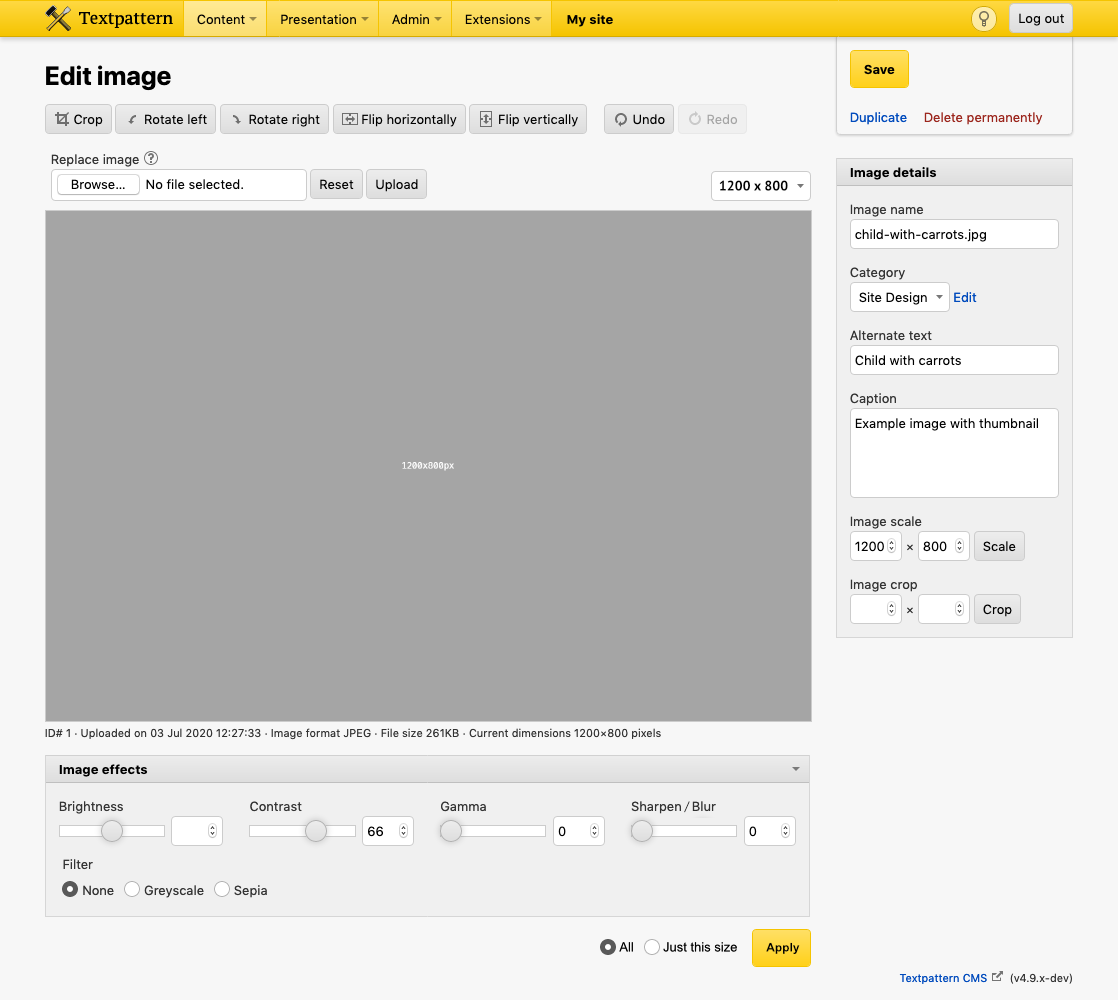
I’m thinking that if you alter the size dropdown to load a different image in for editing, your current operations / undo history are discarded (maybe a warning is shown). So it’s not super complicated to keep a history, as it’s only for one image at a time.
Haven’t thought about scaling options yet, so ignore that bit. The only other tweak I made to the Filters panel is that I wondered if it might be nice to combine blur/sharpen into a single slider. Center is ‘Nothing’, drag left to blur, right to sharpen. They’re mutually opposable operations, right? You wouldn’t blur and then sharpen independently (or vice versa), would you?
Last edited by Bloke (2021-03-28 12:14:40)
The smd plugin menagerie — for when you need one more gribble of power from Textpattern. Bleeding-edge code available on GitHub.
Hire Txp Builders – finely-crafted code, design and Txp
Offline
Re: Images and the file system layout from 4.9.0
philwareham wrote #329536:
And regarding file directory – again why over complicate.
Because there are people with thousands and thousands of images. Wedding photographers like Ross Harvey have 8k+ photos in that one dir. That’s 16k files including thumbs. It’s painful to manage images if you ever have to dive in and manage them via a file browser like FTP to the host (which I’ve had to do when sites are hit by hackers). And I know of systems that have tens of thousands of images – double that when including core thumbs.
Although there are many sites that don’t use a vast number of images, we kind of owe it to photobloggers and image-heavy sites to at least let their systems breathe and make it easier to manage. So I’m looking for sane, scalable storage methods.
Since we’re already planning moving public assets to a single folder I figured now might be a good time to do it for images too. Maybe it’s a step too much too soon? I’m fine with leaving the /images directory in place and just augmenting it with subdirs for multiple thumbs. But I do want to get away from ‘everything in one dir’. On that note…
for each image id also have a sub directory in there labelled with image ID and within that a temp folder for the work images plus the image at various sizes – either loose or again within subdirectories.
… doing that swaps 20000 image files for 20000 directories. Is that any better from a management perspective? Marginally, but it’s still s-l-o-w, as it has to read all those dir names when you enter the /images directory.
Honestly, I don’t know which way to go. But I think we have to do something.
Regarding temp images, I was intending to have this file structure:
/path/to/images
-> _tmp
-> subdir/image files
-> subdir/image files
-> subdir/image files
...
That well-known _tmp dir is the one that houses your undo states. Each time you make an adjustment, a new file with the ID and the transformation applied is written there and we link to it from the UI so you can see the effects in the browser. When you Apply, that version is copied over, replacing the one in your real subdir, and the temp history files for all images matching that id are trashed.
My reasoning was that if we have a _tmp dir in each image’s subdir we have to muck about with creating them if they don’t exist. And if you ever want to clean up and remove them all, it’s simpler to just go into the single, well-known _tmp dir and blat all the accumulated images than it is to hunt for them in every single dir splattered across the file system.
Last edited by Bloke (2021-03-28 12:19:03)
The smd plugin menagerie — for when you need one more gribble of power from Textpattern. Bleeding-edge code available on GitHub.
Hire Txp Builders – finely-crafted code, design and Txp
Offline