Textpattern CMS support forum
You are not logged in. Register | Login | Help
- Topics: Active | Unanswered
Re: themes on 4.8beta
Destry wrote #321177:
With regard to attaching it to section names, I’m not so sure about that. I wouldn’t like that.
With it on the Theme column, it aligns nicely with the assigned assets making it very clear, visually, that is the theme/page/style assiged in development.
I would agree if we always needed a separate theme for dev preview, but we don’t. You can create a new page/style within the current ‘live’ theme and switch dev preview to these assets. In this case ‘Development’ pill is currently not displayed at all.
Offline
Re: themes on 4.8beta
Destry wrote #321177:
With it on the Theme column, it aligns nicely with the assigned assets making it very clear, visually, that is the theme/page/style assiged in development
That nice alignment, if you don’t mind, is completely dependent on the window width, the number of columns to display, the length of the strings, the users language… IOW, you’re in luck for screenshot.
In low-power mode.
Sand space – admin theme for Textpattern
phiw13 on Codeberg
Offline
Re: themes on 4.8beta
etc wrote #321178:
I would agree if we always needed a separate theme for dev preview, but we don’t. You can create a new page/style within the current ‘live’ theme and switch dev preview to these assets. In this case ‘Development’ pill is currently not displayed at all.
Yes, I know, my image there shows the two default examples. Is it really that confusing against the development assignments? It doesn’t strike me as so.
phiw13 wrote #321179:
That nice alignment, if you don’t mind, is completely dependent on the window width, the number of columns to display, the length of the strings, the users language… IOW, you’re in luck for screenshot.
Yes, I know, but hopefully users understand in contexts like these (working with themes dev) that you can turn off six needless columns in the Sections panel so you’re only looking at what matters in this case. As the image and documentation suggests.
I honestly doubt anyone is setting up themes development on their dumbphone.
Offline
Re: themes on 4.8beta
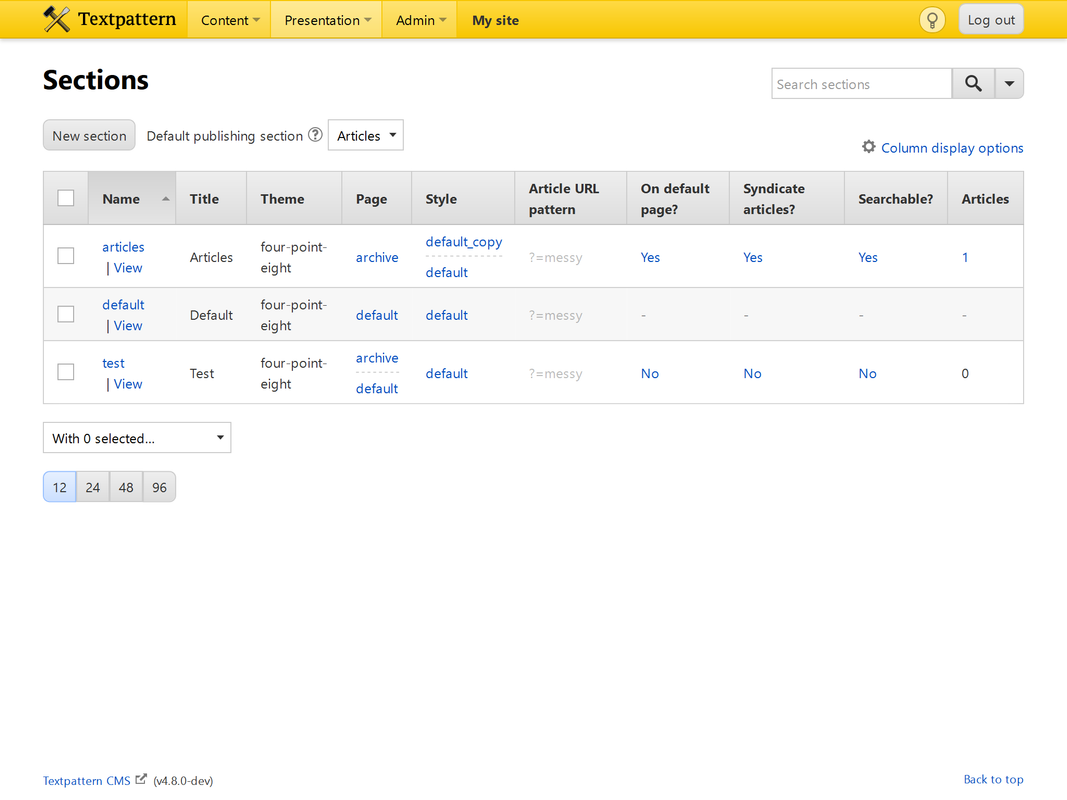
Is it so evident that articles and test sections are under development?
Offline
Re: themes on 4.8beta
etc wrote #321178:
I would agree if we always needed a separate theme for dev preview, but we don’t.
If I understood correctly from earlier comments in the repo, there is the idea of actually making live and dev environments/previewing entirely separate, so you don’t even see the dashed lines, presumably? There’s only ever one value per cell, be it live or dev? Perhaps depending on how the preference is set?
I’m also under the impression that was proposed as 4.8.1 release?
If that’s the case, I’m thinking this quibbling about ‘pills’ and their placement now is irrelevant if such a separation of live/dev enviros is actually the future.
Is any of that correct?
Offline
Re: themes on 4.8beta
Destry wrote #321182:
If I understood correctly from earlier comments in the repo, there is the idea of actually making live and dev environments/previewing entirely separate, so you don’t even see the dashed lines, presumably? There’s only ever one value per cell, be it live or dev? Perhaps depending on how the preference is set?
That would declutter UI, for sure, but site devs would loose the possibility to easily compare live and dev settings. Whence the doubts.
I’m also under the impression that was proposed as 4.8.1 release?
If that’s the case, I’m thinking this quibbling about ‘pills’ and their placement now is irrelevant if such a separation of live/dev enviros is actually the future.
If accepted, I would rather do it now. But in any case, this ‘pill’ works inconsistently as is and I would remove it. Or put it below section name.
Offline
Re: themes on 4.8beta
etc wrote #321181:
Is it so evident that
articlesandtestsections are under development?
Well, based on the fact you removed the pill entirely here, changing the context of what I was talking about, the issue becomes something different.
If you really want to remove the pill entirely, then the visual/code cue needs changed to something else, such as an orange background on the assigned theme/assets names.
But, again, see my question about what the future development aims really are. Because at this point I have no clue what to expect.
Edit: You beat me. ;)
Offline
Offline
Re: themes on 4.8beta
Oh, I see. You picked a special case.
Well, I’m hanging it up until Monday. Do what you all think needs done and I’ll rewrite and image-fix when it’s locked down. Nothing else makes sense to me at this point.
Offline

Re: themes on 4.8beta
Let’s just take stock a moment. As it stands right now:
- Turning OFF the ‘Enable development theme preview?’ pref removes ALL ability to do development work for your logged-in persona:
- No theme assignment to dev.
- No deploy live->dev.
- No reset to live.
- No “dual lane” assets or themes.
- You see the live assets at all times.
- Turning ON the ‘Enable development theme preview?’ pref enables:
- “Dual lane” assets or themes.
- Assign a different Theme/Page/Style to live and/or dev.
- Assign a different Page/Style to live and/or dev within the same theme. If this is done for a dev asset, the “In development” pill is not shown.
- Deploy assets from live->dev (whether in the same theme or not).
- Reset assets to their current live state (removing the dev asset assignment).
- You see the dev assets at all times, if they are in effect.
So the question is: if you are overriding assets (a.k.a. doing development) by changing a section’s assets from one page/style to another within the same theme how do we mark this up in the UI, because it differs from the markup used if the assets are from a different theme.
We can either:
- Add the pill somewhere else in the row if there’s any development going on, regardless if it’s within the same theme or a different one.
- Remove the pill entirely from the Sections panel.
- Add some form of legend (if the ‘Enable development theme preview?’ is ON) that explains the upper lane of assets are Development assets and will override anything in the lane beneath the dashes.
- Something else…
Last edited by Bloke (2020-01-17 13:35:13)
The smd plugin menagerie — for when you need one more gribble of power from Textpattern. Bleeding-edge code available on GitHub.
Hire Txp Builders – finely-crafted code, design and Txp
Offline
Offline
Re: themes on 4.8beta
Bloke wrote #321187:
So the question is: if you are overriding assets (a.k.a. doing development) by changing a section’s assets from one page/style to another within the same theme how do we mark this up in the UI, because it differs from the markup used if the assets are from a different theme.
My suggestion was to put it somewhere along/below section names.
Offline
Re: themes on 4.8beta
etc wrote #321189:
My suggestion was to put it somewhere along/below section names.
Right, which makes sense to indicate that development is going on somewhere in this row, and is a nice warning that some overriding is going on. I like it, and prefer it to having no indicator at all.
The only thing it doesn’t address – for newbies at least – is what the ‘lanes’ either side of the dashes mean.
We’ve experimented with ‘greying out’ entries but that’s ambiguous: the lower asset in the lane is still in force for the world to see, just not for those with the preview setting on, so greying it out is a little confusing.
We’ve experimented with adding an indicator directly alongside the theme name. That’s great if the theme has changed but isn’t made clear if you’re swapping assets within a single theme. And I agree there is nothing special about this case, it’s a logical extension of doing development on a live server.
So what we need to figure out is how best to mark up the fact that the upper lane is in force for anyone who has the preview pref on so it’s not super intrusive but is still clear that what you see on the front-end is NOT indicative of what the world at large are seeing at this moment.
Last edited by Bloke (2020-01-17 13:46:30)
The smd plugin menagerie — for when you need one more gribble of power from Textpattern. Bleeding-edge code available on GitHub.
Hire Txp Builders – finely-crafted code, design and Txp
Offline
Re: themes on 4.8beta
Bloke wrote #321187:
Add some form of legend (if the ‘Enable development theme preview?’ is ON) that explains the upper lane of assets are Development assets and will override anything in the lane beneath the dashes.
If we put the pills beneath section names and dev assets beneath live assets (with top-aligned table cells), they will be nicely aligned.
Offline
Re: themes on 4.8beta
etc wrote #321191:
If we put the pills beneath section names and dev assets beneath live assets (with top-aligned table cells), they will be nicely aligned.
On all width devices? If so, well, maybe that’d work, yeah.
When I said ‘legend’ I was thinking more of explanatory text outside the table or in a pophelp, something like:
“Assets and themes above the dashed divider are in development and visible only to users who have the Enable development theme preview setting switched on.”
But your idea works too. Probably better.
EDIT: I seem to recall the only reason we moved dev above live was to indicate it was “overriding” them. If we switch that order, we lose that little clue, but then we could argue that, since there’s really no change as far as web visitors are concerned, the top asset is the one “in force” and the one underneath is “waiting to be pushed up” (deployed). That might work as a concept.
Last edited by Bloke (2020-01-17 13:53:05)
The smd plugin menagerie — for when you need one more gribble of power from Textpattern. Bleeding-edge code available on GitHub.
Hire Txp Builders – finely-crafted code, design and Txp
Offline