Textpattern CMS support forum
You are not logged in. Register | Login | Help
- Topics: Active | Unanswered
Auto-rotation of the skin layer of themes by dates/season/holidays?
Let’s say I don’t want to do any deep structural changes with themes, but just want to change the ‘skin’ aspect of my theme, site-wide, on a seasonal basis, but without me having to manually switch it every three months.
How might that be approached? Not possible yet out of box?
Offline

Re: Auto-rotation of the skin layer of themes by dates/season/holidays?
You’re probably best off doing this in your template via conditionals. You can probably use <txp:evaluate> to test if the date, for example, lies within a range and include a different Stylesheet based on the result.
Edit: I’ll leave it as homework for Oleg to provide the most efficient example ;)
Last edited by Bloke (2019-11-20 12:46:06)
The smd plugin menagerie — for when you need one more gribble of power from Textpattern. Bleeding-edge code available on GitHub.
Hire Txp Builders – finely-crafted code, design and Txp
Offline

Re: Auto-rotation of the skin layer of themes by dates/season/holidays?
You can do it fairly simply with etc_date but I am sure evaluate can do something similar.
<txp:etc_if_date value="09-23 | 12-21" format="%m-%d">
	<txp:css format="link" media="" name="autumn" />
</txp:etc_if_date>
<txp:etc_if_date value="12-22 | 03-20" format="%m-%d">
	<txp:css format="link" media="" name="winter" />
</txp:etc_if_date>Offline

Re: Auto-rotation of the skin layer of themes by dates/season/holidays?
I’ll second that. I’ve used etc_date for exactly this for years.
<txp:evaluate> may be more efficient, but etc_date works and is easy to use.
Offline
Re: Auto-rotation of the skin layer of themes by dates/season/holidays?
Thanks all.
Offline
Re: Auto-rotation of the skin layer of themes by dates/season/holidays?
Offline
Re: Auto-rotation of the skin layer of themes by dates/season/holidays?
etc wrote #320150:
Sorry, my kids are my exclusive homework furnishers :-)
Just like my house.
And thanks for the hint.
Offline
#8 2019-11-21 13:09:34
- singaz
- Member
- Registered: 2017-03-12
- Posts: 150
Re: Auto-rotation of the skin layer of themes by dates/season/holidays?
crib sheet
month-<txp:evaluate query='<txp:php>print date ('m');</txp:php>' />will be displayed:
month-01
month-02
…………………..
month-11
month-12
<img src="month-<txp:evaluate query='<txp:php>print date ('m');</txp:php>' />.png" >Last edited by singaz (2019-11-21 13:10:23)
Sorry my horror English. I’m learning textpattern, I’m learning English
Offline
Re: Auto-rotation of the skin layer of themes by dates/season/holidays?
singaz wrote #320179:
<img src="month-<txp:evaluate query='<txp:php>print date ('m');</txp:php>' />.png" >...
Or even
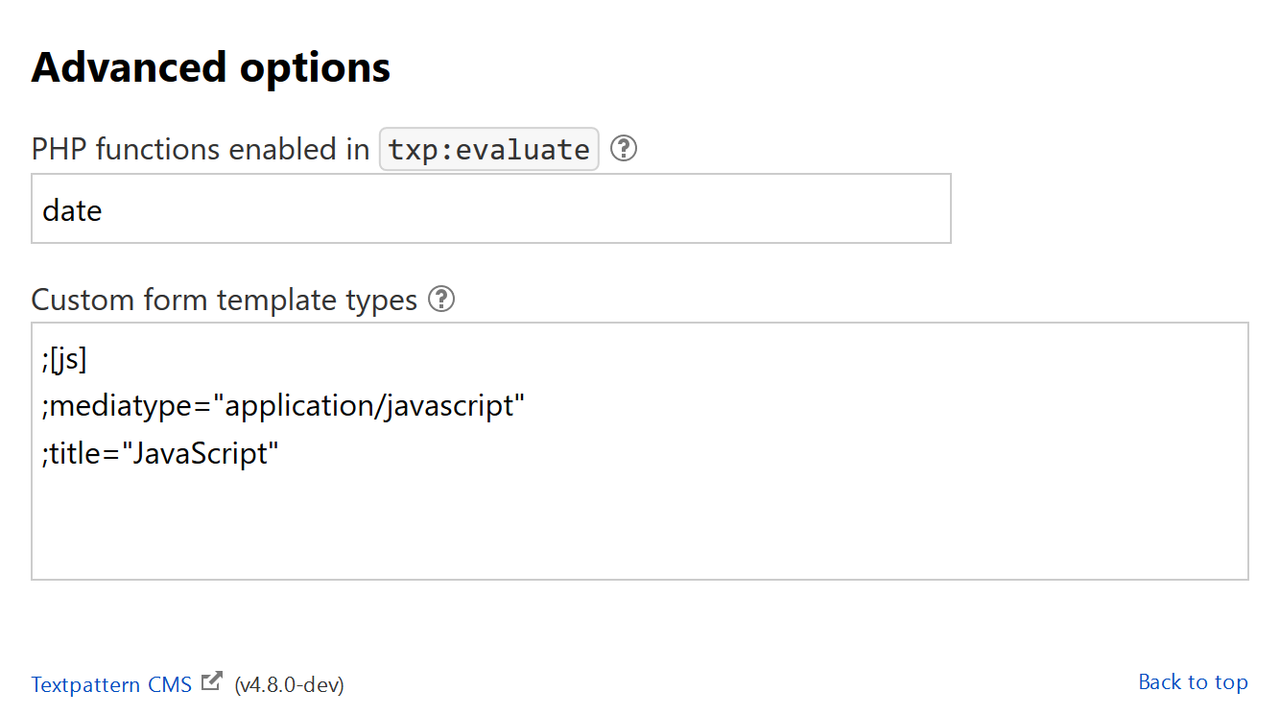
<img src="month-<txp:php>print date ('m');</txp:php>.png" >but we don’t consider <txp:php /> as “core” solution, right? However, if you register date function in PHP functions enabled in txp:evaluate pref, you will be able to call
<img src="month-<txp:evaluate query="date('m')" />.png" >Offline
#10 2019-11-21 19:25:46
- singaz
- Member
- Registered: 2017-03-12
- Posts: 150
Re: Auto-rotation of the skin layer of themes by dates/season/holidays?
How to register a function for <txp:evaluate/> ?
<txp:php>print date ('m');</txp:php>
or
print date ('m');
or
date ('m');
php
This does not work.
What syntax should be?
Last edited by singaz (2019-11-21 19:32:52)
Sorry my horror English. I’m learning textpattern, I’m learning English
Offline
Offline
#12 2019-11-21 19:43:54
- singaz
- Member
- Registered: 2017-03-12
- Posts: 150
Re: Auto-rotation of the skin layer of themes by dates/season/holidays?
Oh yeah! Here is how it works.
Thanks.
I tried many options here .
But just “data” did not understand.
Everything just worked. It turns out that can register the “time” and change the blocks during the day.
Great opportunities open up.
I love textpattern!
Last edited by singaz (2019-11-21 19:54:49)
Sorry my horror English. I’m learning textpattern, I’m learning English
Offline
Re: Auto-rotation of the skin layer of themes by dates/season/holidays?
singaz wrote #320189:
It turns out that can register the “time” and change the blocks during the day.
I like date_sunrise … but it works unreliably.
Offline
#14 2020-02-26 15:48:48
- singaz
- Member
- Registered: 2017-03-12
- Posts: 150
Re: Auto-rotation of the skin layer of themes by dates/season/holidays?
The task is a little harder and I do not know how to do it.
There is an article, a list of names with birthdays:
Name 1, 28.02.2020
Name 2, 01.03.2020
Name 3, 05.03.2020
Name 4, 12.03.2020
Name 5, 04.04.2020
Name 6, 15.04.2020
Name 7, 03.05.2020
Name 8, 09.05.2020
Every month you need to show the names of the people of the birthday.
How to automate?
My way is not working:
<txp:variable name="month" value="<txp:evaluate query='<txp:php>print date ('m');</txp:php>' />" />
or
<txp:variable name="month" value="<txp:evaluate query='date('m')' />" />
<txp:if_variable name="month" value="2">
Name 1, 28.02.2020
</txp:if_variable>
<txp:if_variable name="month" value="3">
Name 2, 01.03.2020
Name 3, 05.03.2020
Name 4, 12.03.2020
</txp:if_variable>I know about the plugin etc_date. Maybe there is a way to do it without a plugin?
Last edited by singaz (2020-02-26 15:51:50)
Sorry my horror English. I’m learning textpattern, I’m learning English
Offline

Re: Auto-rotation of the skin layer of themes by dates/season/holidays?
singaz wrote #321923:
The task is a little harder and I do not know how to do it … Maybe there is a way to do it without a plugin?
The PHP manual for the date function says that m = “Numeric representation of a month, with leading zeros” and n = ‘Numeric representation of a month, without leading zeros’ so either:
- try your tests with
02or03, or - use:
date('n').
You might also want to try if you can skip the variable and go with evaluate (you’ll need to add “date” to the functions permitted for evaluate in Admin › Preferences › Advanced options):
<txp:evaluate query="date('n') == '2'">
Name 1, 28.02.2020
</txp:evaluate>
<txp:evaluate query="date('n') == '3'">
Name 2, 01.03.2020
Name 3, 05.03.2020
Name 4, 12.03.2020
</txp:evaluate>
(untested).
TXP Builders – finely-crafted code, design and txp
Offline