Textpattern CMS support forum
You are not logged in. Register | Login | Help
- Topics: Active | Unanswered

Linklog with RSS to Twitterfeed
I’ve been using the tfu_linklog plugin (http://forum.textpattern.com/viewtopic.php?pid=50426) for longer that I can remember for a delicious-like linklog on mistersugar.com.
I’ve also been reading scripting.com, for longer, and like where Dave is going with his insistence that he control his content. He’s posting a linklog once again in his sidebar, and pushing his links to Twitter with twitterfeed.com.
I’m using the tfu_linklog RSS feed for my Sugarcubes linklog, and now pushing my links to my Twitter account.
So, my question: is there a better way for me to be doing this? The tfu-linklog plugin is no longer supported, delicious is to bite the dust soon, and I want to continue to keep my content in the Txp database.
Suggestions?
—-
Anton aka mistersugar – ‘yumi stap storian’ – antonzuiker.com
Offline

Re: Linklog with RSS to Twitterfeed
I actually still use delicious for all my bookmarking and then have them auto-mirrored to my trunk.ly and pinboard.in accounts for backup. I am still hoping that delicious hangs on although that is pretty doubtful at this point.
Offline
Re: Linklog with RSS to Twitterfeed
Thanks for reminding me about those other bookmarking sites.
Now I’m thinking that what I really want to be doing is to create a section for asides, or shorter posts not meaty enough for my main blog section. May try this out tonight, and see if I can figure out how to have an aside section, display it on my home page, and feed the asides RSS to my Twitter account via dlvr.it or twitterfeed.com.
—-
Anton aka mistersugar – ‘yumi stap storian’ – antonzuiker.com
Offline
Re: Linklog with RSS to Twitterfeed
Basically, I’m intrigued by the Wordpress post formats, and for years have been wanting to give myself more content flexibility on my site.
—-
Anton aka mistersugar – ‘yumi stap storian’ – antonzuiker.com
Offline
Re: Linklog with RSS to Twitterfeed
Post Formats are definitely a cool idea – but to me, Textpattern has kind of always had that. You can put articles in different sections and style those sections however you like. Especially if you toss some custom fields in the mix. Now what would be cool is only having custom fields appear when they are needed for a specific post type/article section.
The style you are using reminds me of the way Paul Gruber does things over at Daring Fireball – which is still powered by Movable Type as far as I know.
Offline
Re: Linklog with RSS to Twitterfeed
Brent Simmons rewrote his custom blogging system to be able to have title-less posts: http://inessential.com/2018/04/08/blogging_system_rewrite
Which made me dig into the Forum to see when I last contemplated trying that in Textpattern = 7 years ago!
Is it any easier in Textpattern 4.7 to have a blog with a mix of titled posts and title-less posts?
Last edited by mistersugar (2018-04-09 14:04:18)
—-
Anton aka mistersugar – ‘yumi stap storian’ – antonzuiker.com
Offline

Re: Linklog with RSS to Twitterfeed
I’m not sure how we’d reconcile that in Txp. Articles without a title get called untitled but if you have a whole bunch of those around things are going to get confusing.
Mostly this is due to difficulties in issuing a URL title to multiple resources in the same section with the same ‘untitled’ title! You’d have to use messy mode or ensure the id was in the permalink scheme.
As Michael says, you can write posts in a dedicated section and just not show them on the site. Then just use article_custom or a shortcode to process them when you want to list such articles as asides on your site. Beyond that, I’m not sure. Seems like you need custom content types.
The smd plugin menagerie — for when you need one more gribble of power from Textpattern. Bleeding-edge code available on GitHub.
Hire Txp Builders – finely-crafted code, design and Txp
Offline

Re: Linklog with RSS to Twitterfeed
mistersugar wrote #245188:
Now I’m thinking that what I really want to be doing is to create a section for asides, or shorter posts not meaty enough for my main blog section. May try this out tonight, and see if I can figure out how to have an aside section, display it on my home page, and feed the asides RSS to my Twitter account via dlvr.it or twitterfeed.com.
Bloke wrote #310816:
As Michael says, you can write posts in a dedicated section and just not show them on the site. Then just use article_custom or a shortcode to process them when you want to list such articles as asides on your site. Beyond that, I’m not sure. Seems like you need custom content types.
That would do it.
Create yourself a set of different article forms for your different post types e.g. snippet, link, quote, gallery, video etc. and then use the “Override form” dropdown on the write pane to switch to the article type you want. That would give a tumblr-like setup of sequential posts with different information. If you don’t want them to actually show on an individual page, just output them in your sidebar or your tumblelog without a permlink to the individual article.
The only thing you need to do is to redirect manual calls to individual articles to your main section landing page (e.g. with smd_redirect or arc_redirect or htaccess or an individual page template that pushes back to the section), and to create a custom rss feed (if you’re using one) that suppresses the individual links.
If you want the option of a longer article with an own link once in a while, you can also do something like:
<txp:if_excerpt>
    <txp:excerpt />
    <txp:permlink>Read more…</txp:permlink>
<txp:else />
    <txp:body />
</txp:if_excerpt>
And then if you fill out the excerpt field you get a deep linked article.
There are also plugins like smd_short_url and rah_pathway that offer you ways of giving your articles a different permlink.
If you want different custom fields for different post types, you could organise it slightly differently. Instead of using override form, you could assign your different post types to their individual sections but output them all in one section (sorted by date not section) and then use bot_wtc to show the different custom fields on different sections. If you decided to use just the /title url scheme (or id/title or year/month/day/title), you would get something like daringfireball even if you were using sections internally to aid your own organisation.
TXP Builders – finely-crafted code, design and txp
Offline
Re: Linklog with RSS to Twitterfeed
Thanks, all! I’ll dig into this very soon. Just getting back up to speed on my blogging, and looking forward to firing up 4.7.
—-
Anton aka mistersugar – ‘yumi stap storian’ – antonzuiker.com
Offline
Re: Linklog with RSS to Twitterfeed
Long-running thread here … let’s check in on the ability to have title-less posts … Dave Winer says Wordpress is going to implement title-less feed items. How does this sit with Txp devs? Can Txp feeds already do this, or does the above thread about our limitations for title-less posts mean feed items have to have a title?
—-
Anton aka mistersugar – ‘yumi stap storian’ – antonzuiker.com
Offline
Re: Linklog with RSS to Twitterfeed
Honestly, our core feeds construction looks too rigid to allow for a full customization, unless you want to create an external form. We should do something, but meanwhile, to get rid of titles in rss, you can set show_comment_count_in_feed pref to No and use this tiny plugin:
register_callback(function() {
    global $thisarticle;
    if ($thisarticle['section'] == 'aside') {// or whatever
        $thisarticle['title'] = false;
    }
}, 'rss_entry');Offline
Re: Linklog with RSS to Twitterfeed
Dave Winer is not just advocating making titles optional, he is suggesting that the reading experience change at the recipient’s end.
In this screenshot, titles are the first bolded words on the line, immediately followed by the body. For posts without titles, the first X words of the body are bolded. The reader doesn’t see a difference between titled and untitled posts.
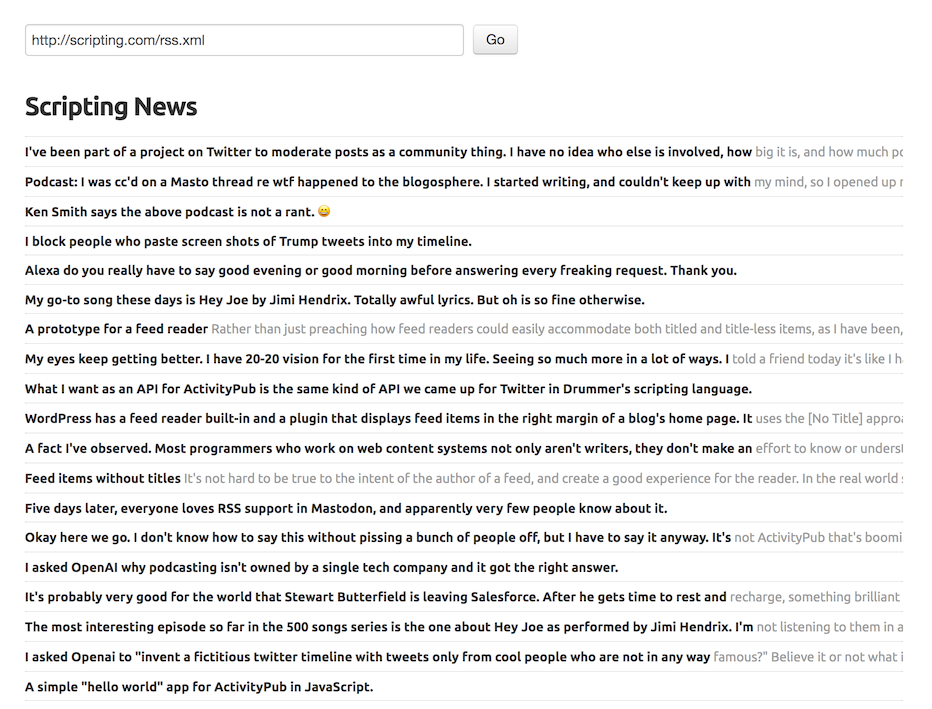
Below is a bit of code that will output a proper RSS feed with mixed title and title-less items. However, I notice that modern TXP no longer lets you save an article without a title. In the code below, it assumes that you title your titleless articles as ‘untitled’.
- Create a page called ‘feed_page’ (or whatever you want)
- Paste the code below on it, save
- Create a section called ‘feed’ (or whatever you want)
- Add feed_page to this section
https://www.yourdomain.xyz/feed/ is now serving up your RSS
<txp:php>
header('Content-Type: text/xml');
echo '<?xml version="1.0" encoding="UTF-8" ?>';
</txp:php>
<rss version="2.0" xmlns:atom="http://www.w3.org/2005/Atom">
<channel>
<title><txp:site_name /></title>
<language>en-gb</language>
<description><txp:site_slogan /></description>
<generator>Textpattern 4.8.8</generator>
<link><txp:site_url /></link>
<atom:link href="<txp:site_url />feed/" rel="self" type="application/rss+xml" />

<txp:article>
  <txp:variable name = 'rss_title' value = '<txp:title />' />
       <item>
         <txp:if_variable name = 'rss_title' value = 'untitled'>
              <txp:else />
               <title><txp:variable name = 'rss_title' /></title>
         </txp:if_variable>
          <description><![CDATA[<txp:body />]]></description>
          <link><txp:site_url />index.php?id=<txp:article_id /></link>
          <guid><txp:site_url />index.php?id=<txp:article_id /></guid>
          <pubDate><txp:posted format="%a, %d %b %Y %H:%M:%S -0200"/></pubDate>
      </item>
</txp:article>

</channel>
</rss>
Moderator: Edited display of code block. FYI: entering bc..{space}{newline}txp{newline}your txp code will show a code block with syntax highlighting.
Offline
Re: Linklog with RSS to Twitterfeed
That’s one way of doing a custom RSS feed. Another way is to use a form with a custom mediatype and utilize the ability to output that form via the url https://yourdomain.com/?f=form_name. It does basically the same thing without using a section for it.
- Go to Admin › Prefs › Admin and set “Advanced options” to on (if not already. This is a once-only setting).
- Now visit Admin › Prefs › Advanced Options and under “Custom form template types” append something like:
[feed]
mediatype="application/xml"
title="Feed"- Now visit Presentation › Forms and you’ll see a new form type heading called “Feed”. Add a new form, e.g.
news_feedand assign it to the new “Feed” form type and put your custom rss code in that. The Content-Type txp:php block at the top is not necessary as the form will automatically be rendered with the mime-type specified under advanced options. - Your form is now accessible via
https://yourdomain.com/?f=news_feed
You can combine this with a mini-plugin to give these clean urls – see this post.
–––
Here’s another (untested) idea of how to do title-less articles: currently you are setting the article title to “untitled” but you’ll find you’ll need to alter the article url title each time to avoid identical article name clashes, e.g. untitled-1, untitled-2…
Another way might be able to use the much under-utilised “override form” select box under “Sort and Display” on the write tab. You can use this dropdown to set an article to optionally use a form different from that assigned by default (a nice trick for when you want to do a tumblr-like site with alternating post types). If you make an article form similar to the default (or whatever you are using) that doesn’t output the title, you can give it whatever title you want in Textpattern but not output it on your page.
For your rss code that would mean detecting which override form is being used, e.g. using the custom_field trick in place of your rss_title variable:
<txp:if_custom_field name="override_form" value="titleless_article" not>
    <title><txp:title /></title>
</txp:if_custom_field>
I’ve not tried this out but that should skip the article title if the override form is set to the form titleless_article. For all other articles, the title is shown.
What I’ve not understood is how the first X words of a title-less post get emboldened. Does that at the reader’s end? I’ve read the GitHub post properly now: the emboldening is done by that RSS reader script.
TXP Builders – finely-crafted code, design and txp
Offline
Re: Linklog with RSS to Twitterfeed
There are few small problems with manual constructions:
- Title should be xml-escaped, otherwise a lonely ampersand
&or html entities like would invalidate the feed. Escaping is more tricky than<txp:title escape />, since this would convert, say, into&nbsp;which is not human readable. - Same for
CDATA, enclosing body within<![CDATA[...]]>will not suffice if body contains]]>. - I’m not sure whether this is really required, but core feeds contain also
<guid />tags with some article data (uidandfeed_time) not available via txp tags.
The first two points can be solved by adding some xml and cdata options to the global escape attribute. The last one needs some thinking. We could delegate ‘content’ fields (title, body, etc) output to a form, and let core append ‘meta’ tags (like guid). But this needs either a form name convention, or a pref for each feed type (rss/atom). Also, per section feeds would need these forms to be available in each theme.
Offline
Re: Linklog with RSS to Twitterfeed
For the overall blog guid there’s:
<txp:php>echo get_pref('blog_uid');</txp:php>and for the item uid (with isPermaLink="false") you could use the article uid:
<txp:php>global $thisarticle; echo safe_field('uid', 'textpattern', 'ID="'.$thisarticle['thisid'].'"');</txp:php>I thought <txp:php>global $thisarticle; echo $thisarticle['uid'];</txp:php> might work but it doesn’t seem to.
TXP Builders – finely-crafted code, design and txp
Offline