Textpattern CMS support forum
You are not logged in. Register | Login | Help
- Topics: Active | Unanswered

kuo_sortable: change the order and visibility of elements in Write tab
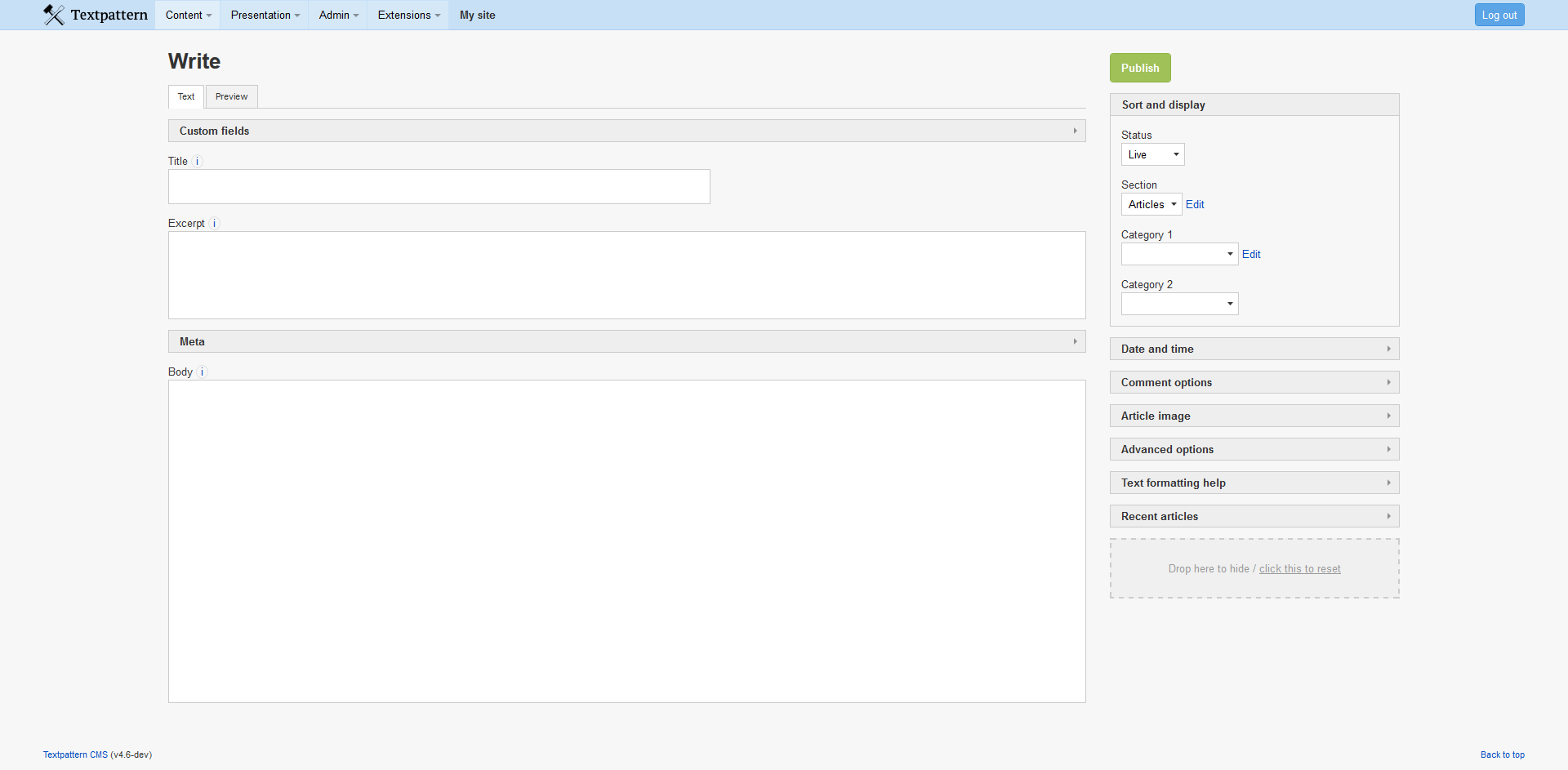
If your website doesn’t use comments functionality at all, there’s no need to show the “Comment options” box in Write tab. With this plugin you can hide it. The main thing with this plugin is that it allows users to rearrange elements somewhat to their liking. Settings are saved per user. Inspired by what Pat64 wrote in this topic. ;-)
Last edited by kuopassa (2016-03-16 21:10:47)
Offline
Re: kuo_sortable: change the order and visibility of elements in Write tab
Something to think about: that “Hide + reset” drop-box in the bottom left corner is in the way! It is fine (probably — didn’t try :-) ) if you have a wide browser window. In my case, my browser windows are never wider than ~1200px. Or think about other devices – iPad, mobile phones, etc. In all those cases, that “Hide + reset” then annoyingly covers the input fields (textareas, etc).
Maybe an idea: could you append it at the bottom of the side bar (div#supporting_content) instead – and not make it position:fixed of course? That way it won’t ever be in the way of the user.
[aside]
bq..
If your website doesn’t use comments functionality at all, there’s no need to show the “Comment options” box in Write tab. With this plugin you can hide it.
You know that you can disable comments on the preferences panel, and in that case that comments box won’t show up? Ok, aside of that, people may want to hide other fields of course.
In low-power mode.
Sand space – admin theme for Textpattern
phiw13 on Codeberg
Offline
Re: kuo_sortable: change the order and visibility of elements in Write tab
Thanks for using the plugin and offering good improvement ideas. The box from bottom left will be relocated at some better place, like the one you mentioned. I’ll try to bundle more updates and fixes to the plugin before releasing a new version. :-)
Offline

Re: kuo_sortable: change the order and visibility of elements in Write tab
@kuopassa
Hey!
I love you, Pete ;)
Super cool. Tks.
Patrick.
Github | CodePen | Codier | Simplr theme | Wait Me: a maintenance theme | [\a mi.ni.ma]: a “Low Tech” simple Blog theme.
Offline
Re: kuo_sortable: change the order and visibility of elements in Write tab
Thanks, Pat64! This functionality could be used in other sections as well, like in Images and elsewhere, but it’s also quite complex and time-consuming to make it happen. So maybe in the future it’ll be expanded to other sections.
Offline
#6 2016-03-14 15:50:16
- uli
- Moderator

- From: Cologne
- Registered: 2006-08-15
- Posts: 4,334
Re: kuo_sortable: change the order and visibility of elements in Write tab
Thanks, Petri, for this super simple to use plugin!
Before I start digging for plugin incompatibilities: Am I the only one whose Been caused by another plugin<div id="view_modes"> is empty on visiting any article saved while this plugin is installed (the div containing the Text/HTML/Preview tabs)?
Last edited by uli (2016-03-15 14:03:41)
In bad weather I never leave home without wet_plugout, smd_where_used and adi_form_links
Offline
#7 2016-03-14 17:58:14
- candyman
- Member

- From: Italy
- Registered: 2006-08-08
- Posts: 684
Re: kuo_sortable: change the order and visibility of elements in Write tab
Good job!
Offline

Re: kuo_sortable: change the order and visibility of elements in Write tab
Clever! Maybe you place the “hide bin” as a container at the bottom of the sidebar?
Now all it needs is for you to be also able to drag fields into the main column (or did I miss that?).
TXP Builders – finely-crafted code, design and txp
Offline
Re: kuo_sortable: change the order and visibility of elements in Write tab
uli wrote #298262:
Am I the only one whose
<div id="view_modes">is empty on visiting any article saved while this plugin is installed (the div containing the Text/HTML/Preview tabs)?
That seems to work fine here. Does it appear again if you leave the Write panel and then come back to that article later?
On my side, I can’t reorder the sidebar element right after saving a new article: Create an article, Save it (in my case as draft, but the status doesn’t seem to matter), then try to reorder the fields in the side bar: not possible. Leave the Write panel, then come back (via the Articles panel, click on link to recently created article), edit , save. In that case the reorder functionality works fine
In low-power mode.
Sand space – admin theme for Textpattern
phiw13 on Codeberg
Offline
#10 2016-03-15 01:47:26
- uli
- Moderator
- From: Cologne
- Registered: 2006-08-15
- Posts: 4,334
Re: kuo_sortable: change the order and visibility of elements in Write tab
phiw13 wrote #298268:
Does it appear again if you leave the Write panel and then come back to that article later?
Just to give one more possible hint (sorry that I can’t investigate the reasons any further atm):
That div remains empty for the aforementioned articles even if I de-install the plugin. And it’s also the Textile Help section that vanishes from the Write panel. Been caused by another plugin
Last edited by uli (2016-03-15 14:04:11)
In bad weather I never leave home without wet_plugout, smd_where_used and adi_form_links
Offline

Re: kuo_sortable: change the order and visibility of elements in Write tab
This is something I’m keen to get into core in v4.7 – maybe we can work together on a patch during that phase?
Offline
Re: kuo_sortable: change the order and visibility of elements in Write tab
philwareham wrote #298273:
This is something I’m keen to get into core in v4.7 – maybe we can work together on a patch during that phase?
Yep! Pete & Phil, please ;)
Patrick.
Github | CodePen | Codier | Simplr theme | Wait Me: a maintenance theme | [\a mi.ni.ma]: a “Low Tech” simple Blog theme.
Offline
#13 2016-03-15 14:02:20
- uli
- Moderator
- From: Cologne
- Registered: 2006-08-15
- Posts: 4,334
Re: kuo_sortable: change the order and visibility of elements in Write tab
All: OK, I’ve sorted it out: It’s not kuo_sortable causing the strange behaviour. It’s been an old version of kuo_ckEditor_cdn I’ve had active because I’ve updated one of my local TXP test instances to 4.6 nightly. I’ve now updated the editor plugin and I can save normally without destroying anything.
Petri, in lack of a kuo_ckEditor_cdn forum topic I report about it here:
kuo_ckEditor_cdn v0.2 doesn’t work in 4.6 and breaks all of kuo_sortable’s capabilities: drag’n‘drop is not possible and the X-field is not displayed.
Sorry for scaring you up with things that didn’t belong here, and thanks again for kuo_sortable and all of your other countless plugins I encountered again while looking for the ckEditor topic.
In bad weather I never leave home without wet_plugout, smd_where_used and adi_form_links
Offline
Re: kuo_sortable: change the order and visibility of elements in Write tab
Thanks everyone for feedback! The plugin is now updated. It fixes some issues and now it’s also possible to move most elements between columns.
Phil: Sure thing, if you want to use parts or all of this plugin’s code then no problem.
uli: I’m trying to figure out what is causing that issue with CKEditor. It seems to work fine with my Textpattern installations, except adjusting editor height is not possible as it triggers the sort/drag functionality.
Offline
#15 2016-03-16 23:59:24
- uli
- Moderator
- From: Cologne
- Registered: 2006-08-15
- Posts: 4,334
Re: kuo_sortable: change the order and visibility of elements in Write tab
kuopassa wrote #298331:
uli: I’m trying to figure out what is causing that issue with CKEditor. It seems to work fine with my Textpattern installations, except adjusting editor height is not possible as it triggers the sort/drag functionality.
Great. If you can you afford some broken articles (mine were set to live, if that makes a difference), replace CKEditor v0.2 by the old 0.1. Save some articles, then, and install the newer CKE. Maybe that procedure caused something on the database and as a consequence the 0.2 plugin is broken. Some of the articles definitely appear without the two mentioned Write panel elements even with all plugins disabled, so assuming a DB damage isn’t too far-fetched. (not blaming you, all in a sandbox ^ ^)
In bad weather I never leave home without wet_plugout, smd_where_used and adi_form_links
Offline