Textpattern CMS support forum
You are not logged in. Register | Login | Help
- Topics: Active | Unanswered
#2071 2012-10-22 10:08:17
- roughnecks
- Member
- Registered: 2012-01-26
- Posts: 41
Re: MLP - The Multi-Lingual Publishing Pack
The only possible cause i can think of is that, when i was translating, a couple of times i went back with the browser button and it asked me if i wanted to reload the page: my bad, i reloaded. Can this be related?
As far as concerning the type of article, they’re just as the other ones, nothing special i can think about them.
Offline
#2072 2012-10-22 14:15:12
- roughnecks
- Member
- Registered: 2012-01-26
- Posts: 41
Re: MLP - The Multi-Lingual Publishing Pack
Once again it was my fault :/ There were some draft articles duplicated with the same name/content in English; i deleted them and now we’re back to normal.

Sorry and thanks for your help!
/me hopes to exit from the noob’s tunnel, sooner or later :-D
Offline
#2073 2012-10-22 14:22:04

Re: MLP - The Multi-Lingual Publishing Pack
roughnecks wrote:
There were some draft articles duplicated with the same name/content in English; i deleted them and now we’re back to normal.
Ahhh, phew. That explains it. Thanks for letting us know. Perhaps we should document that at some point.
/me hopes to exit from the noob’s tunnel, sooner or later :-D
Hehehe, don’t worry about it. We’re here to help.
The smd plugin menagerie — for when you need one more gribble of power from Textpattern. Bleeding-edge code available on GitHub.
Hire Txp Builders – finely-crafted code, design and Txp
Offline
#2074 2012-11-06 11:04:20
Re: MLP - The Multi-Lingual Publishing Pack
I just installed Textpattern 4.5.2 on all of my sites completely forgetting that one was running the MLP. Of course it broke the whole site quite badly.
After a short shock I downloaded your pre-patched Textpattern + MLP version from this forum, which luckily brought the frontend of the site back. However, logging into the backend I am completely stuck at Admin > Preferences > Language and I am asked to update languages, clicking on Update will do nothing and there’s no way for me to navigate anywhere else in the admin interface, so I cannot apply any other upgrades of plugins. Any idea what could be causing this?
Offline
#2075 2012-11-06 17:54:19

Re: MLP - The Multi-Lingual Publishing Pack
arglborps wrote:
I just installed Textpattern 4.5.2 on all of my sites completely forgetting that one was running the MLP. Of course it broke the whole site quite badly.
After a short shock I downloaded your pre-patched Textpattern + MLP version from this forum, which luckily brought the frontend of the site back. However, logging into the backend I am completely stuck at Admin > Preferences > Language and I am asked to update languages, clicking on Update will do nothing and there’s no way for me to navigate anywhere else in the admin interface, so I cannot apply any other upgrades of plugins. Any idea what could be causing this?
no backups??
…. texted postive
Offline
#2076 2012-11-06 19:44:03
- els
- Moderator

- From: The Netherlands
- Registered: 2004-06-06
- Posts: 7,458
Re: MLP - The Multi-Lingual Publishing Pack
arglborps wrote:
…I downloaded your pre-patched Textpattern + MLP version from this forum
Exactly which one did you download? There are a lot of different links in this thread. You need the file linked to in this post.
Edit: I assume you installed one of maniqui’s versions. In that case, you don’t have Txp 4.5.2 anymore. If you have access to the database through phpMyAdmin, can you check the value for ‘version’ in the txp_prefs table?
Last edited by els (2012-11-06 19:52:23)
Offline
#2077 2012-11-06 23:02:06
Re: MLP - The Multi-Lingual Publishing Pack
arglborps wrote:
I am completely stuck at Admin > Preferences > Language
Does this topic help at all to uncover the mystery? Or this?
Being stuck on the Languages panel usually indicates an incomplete FTP transfer, which can happen if your FTP program is set to ‘overwrite only if file has changed’ and for some reason the timestamps get compared wrongly or there’s a timezone mismatch.
For completeness you could try this:
- Logout of the admin side.
- Upload the Textpattern files again and force them to overwrite.
- Drop the MLP files (from the archive to which Els linked) in over the top.
- From phpMyAdmin, alter the ‘version’ value in txp_prefs to
4.4.1(or whatever your previous version of Txp was before upgrading to 4.5.2). - Log into the admin side.
and see if that gets you anywhere.
The smd plugin menagerie — for when you need one more gribble of power from Textpattern. Bleeding-edge code available on GitHub.
Hire Txp Builders – finely-crafted code, design and Txp
Offline
#2078 2012-11-06 23:10:24
Re: MLP - The Multi-Lingual Publishing Pack
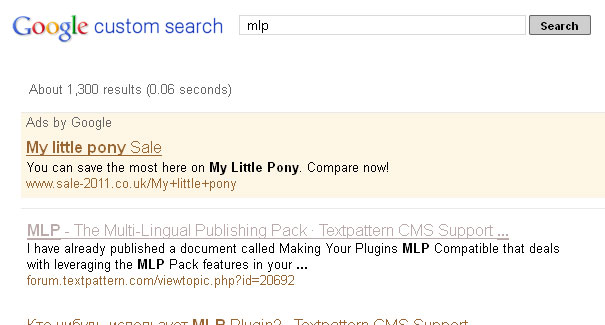
Incidentally, is it time to rename MLP to avoid confusion with a certain horse-based product :-p
The smd plugin menagerie — for when you need one more gribble of power from Textpattern. Bleeding-edge code available on GitHub.
Hire Txp Builders – finely-crafted code, design and Txp
Offline
#2079 2012-11-06 23:17:07
- els
- Moderator
- From: The Netherlands
- Registered: 2004-06-06
- Posts: 7,458
Re: MLP - The Multi-Lingual Publishing Pack
Bloke wrote:
Incidentally, is it time to rename MLP t
NO! MLP is our little pony! :)
Offline
#2080 2012-11-07 18:48:11
- attadanta
- New Member
- Registered: 2012-11-07
- Posts: 3
Re: MLP - The Multi-Lingual Publishing Pack
Hello and thanks for keeping the plugin up-to-date with the latest Textpattern development!
I’ve ran into the following glitches upon installing the latest package (mlp-4.5.x-v01-20121010). These are really non-issues but would’ve turned me away if I hadn’t persisted.
Here’s a quick overview of the setup: Textpattern: 4.5.2 (r4197), PHP 5.3.8, MySQL 5.5.16, 2 installed languages with just the starting “Welcome to Your Site!” article in the database.
- The MLP installation wizard reports the set-up of the special per-language tables as unsuccessful, but the tables do get created.
- Upon creating a new section the user may specify the section title only for the default language. The titles for the rest may be specified upon editing the new section.
Hope this helps.
A.
Offline
#2081 2012-11-07 20:07:36
Re: MLP - The Multi-Lingual Publishing Pack
attadanta wrote:
upon installing the latest package (mlp-4.5.x-v01-20121010).
You might do better with the more recent mlp-4.5.x-v02-20121018 :-) Certainly the second item you mentioned has been fixed in that version.
I believe the mix up was my fault because I forgot to update the opening post and it was pointing to the older revision. Really sorry about that. Thank you for sticking with it and letting me discover the error of my ways. I’ll try and remember to update the OP in future.
Last edited by Bloke (2012-11-07 20:08:36)
The smd plugin menagerie — for when you need one more gribble of power from Textpattern. Bleeding-edge code available on GitHub.
Hire Txp Builders – finely-crafted code, design and Txp
Offline
#2082 2012-11-08 10:10:19

Re: MLP - The Multi-Lingual Publishing Pack
Some of these humongous forum threads, can we find a way to archive and start afresh? Both this topic and glz_custom_fields – users have to trawl through hundreds of posts to get to relevant information. I realise I’ve just made the forum thread even longer, so don’t reply to this here.
Offline
#2083 2012-11-08 15:17:26
- roughnecks
- Member
- Registered: 2012-01-26
- Posts: 41
Re: MLP - The Multi-Lingual Publishing Pack
Good evening and sorry but i haven’t understood if this thread is closed or should be..
I found a problem in the “pop-up textile help” (for IT language) but cannot find the relative missing strings in renditions. Maybe i should have mentioned that these images are about comments form in articles and that i think the relevant part is:
<div id="comments-help"><txp:comments_help /></div>
Here are two shots:
This one is english and it’s correct:

While the Italian one is missing strings:

Can You help? Thanks
Edit:
Is there a way to find out which missing Italian strings belong to the public-side of my site and which to the admin-side? Or am i supposed to translate everything?
Last edited by roughnecks (2012-11-08 19:08:10)
Offline
#2084 2012-11-08 20:13:14
- els
- Moderator
- From: The Netherlands
- Registered: 2004-06-06
- Posts: 7,458
Re: MLP - The Multi-Lingual Publishing Pack
You can’t change the popup help texts, these are on the rpc server. You can post missing strings in the Internationalisation forum, and the Italian translator can update the strings.
Having a way to distinguish the public and admin side strings in MLP is not possible, though it would indeed be a very useful feature. For sites that I maintain myself, I usually only translate the strings for the public side.
There is a way (outside of MLP) though: if you have access to the database you can look in the txp_lang table, it has a column ‘event’, which can have a value public or a number of other values. Basicly everything besides public is admin side.
There is also a rather old thread: MLP Users’ String Exchange where users can post their exported string sets. Unfortunately Italian wasn’t posted there. You could try and ask in the Italian forum if someone has a ready made set for you.
(edit: typo)
Last edited by els (2012-11-08 21:44:45)
Offline
#2085 2012-11-08 20:30:12
- roughnecks
- Member
- Registered: 2012-01-26
- Posts: 41
Re: MLP - The Multi-Lingual Publishing Pack
Els wrote:
You can’t change the popup help texts, these are on the rpc server. You can post missing strings in the Internationalisation forum, and the Italian translator can update the strings.
Hi Els, looking to the provided link this link i cannot find the strings i am missing (i was going to check after the it-it.txt translation and see if something was missing), so i wouldn’t know how to apply the changes.
Having a way to distinguish the public and admin side strings in MLP is not possible, though it would indeed be a very useful feature. For sites that I maintain myself, I usually only translate the strings for the public side.
There is a way (outside of MLP) though: if you have access to the database you can look in the txp_lang table, it has a column ‘event’, which can have a value public or a number of other values. Basicly everthing besides public is admin side.
Ok, thanks, maybe i’ll check that out. Glad to know about it.
Last edited by roughnecks (2012-11-08 20:32:03)
Offline