Textpattern CMS support forum
You are not logged in. Register | Login | Help
- Topics: Active | Unanswered
#31 2011-11-23 12:20:07
- Algaris
- Member
- From: England
- Registered: 2006-01-27
- Posts: 608
Re: Working with live and development sites
jakob wrote:
Espresso allows you to attach several online ftp servers to a single site and control when saving a file syncs to the online repo or not. You can develop locally just by saving the files. When you’re ready to upload the changes, switch on sync with the online server and either re-save the files or use Espresso’s sync function (depending on how much you changed). As you can attach more than one server, you could theoretically add a staging ftp and a live ftp to your local Espresso project. You do need to leave your online site on “testing” production status, though.
This is interesting. Because of the way cnk_versioning works all I’d have to do would be upload the files to the Pages, Form and CSS folders, refresh the Live site in my browser window and it would be online. Is that correct?
Offline

Re: Working with live and development sites
I concur maniqui’s system works well — at least it does for those people working on proper operating systems! With me being stuck on Windows at the moment and everyone else being Mac/Linux-based, some of the filenames of the project were deemed “invalid” because of certain characters in the filenames when I synced the repo. Skipping those and being able to push to git proved problematic, so most of my edits I did “blind” on my local copy and then either:
- published the changes to the Basecamp project so someone else could sync them on my behalf
- uploaded the files directly via SFTP to the staging server
- logged into the staging Txp installation / cpanel and made changes there
With the little script in place to poke local Txp prefs into the database it really is a breeze to keep a local dev copy in sync with a staging or live version of the database: just pull the latest DB down from a central location then double click the script to overwrite the prefs so I can use it in my XAMPP environment. It only alters about 5 or 6 pref values like filesystem paths and site URL.
Syncing back to live though is quite manual because — as you say — articles are going in and out of the DB from clients. Thus we need to cherry pick which tables get overwritten or exported from a local dev branch. Normally that’s not much of an issue because you only tend to work on a little bit at a time and can first push the changes to staging and — once approved — repeat the push to live. But if you’re working on a grand redesign rather than incremental alterations then it might require some rvm_maintenance downtime (cnk_versioning helps here, as jakob says).
Our rule of thumb when messing with the database: export anything in the Presentation section and leave the Content tables well alone unless you really know what you’re doing!
The smd plugin menagerie — for when you need one more gribble of power from Textpattern. Bleeding-edge code available on GitHub.
Hire Txp Builders – finely-crafted code, design and Txp
Offline

Re: Working with live and development sites
This is interesting. Because of the way cnk_versioning works all I’d have to do would be upload the files to the Pages, Form and CSS folders, refresh the Live site in my browser window and it would be online. Is that correct?
Yes, this is basically what I do myself when a staging site would be overkill, or when the staging site becomes the live site after development. If it’s just a quick fix, I’ll experiment with my local installation until it’s working how I want it, then flick on the switch to upload. When you next save it auto-syncs to the ftp without you having to ftp in a second step.
In Espresso 2 the switch is now next to the file and there’s an on/off slider and a drop-down that lets you choose the currently “active” remote server to sync with.
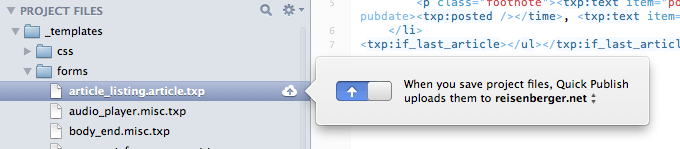
To set up additional remote servers, if you are in an Espresso project, choose “Settings” from the toolbar and you can add your server(s)’s credentials. Via the switcher in the screenshot above you can switch between them, so you could theoretically work locally, trial on your staging site, then switch the upload server to the live site and save/sync again. If you’ve changed a lot of files and don’t remember which files it affects, you can use the bulk sync function (in the left-hand bar at the bottom under the heading “publish” you’ll see your online servers. Click on that, then on sync in the toolbar / the cloud in the main window. You’ll see a sync review before it actually syncs and you can choose to skip files if you want. My only worry there is that it might be too easy to accidentally load stuff to the live site because Espresso doesn’t ask you constantly if you’re sure, so you need keep your wits about you.
You might find that if you work a lot on develop and then only periodically update the live site, that you can basically work on a local<->develop setup, and pull across the changes to the live site manually.
TXP Builders – finely-crafted code, design and txp
Offline
Re: Working with live and development sites
I have been looking at versioning. I started with a trial of Cornerstone a little bit back but recently stumbled a cross http://www.git-tower.com I have to admit I’d rather use a client on my Mac for this kind of thing. I still have a way to go as I don’t fully understand the all concepts regarding versioning yet.
I too am no command-line purist and use Versions for SVN and more recently, for the above project, Tower for Git (unfortunately each is native to its own versioning system and don’t work for both git and svn). Personally I like to see at a glance which files are affected, then click on the file and see the relevant diffs immediately, rather than typing in commands back and forth…
I did find it takes some getting used to and reading up on to get to grips with the versioning systems. Maniqui gave us some tutorials and tips to start with (there is actually quite a lot available online) and he has the most in-depth knowledge of the team. I get the impression that the GUI programs can’t do everything but cover the most common subset of functionality and anyway I think I have only scratched the surface of the GUI tools as yet too so I still feel like I have “learner-plates” on! You can still use the command-line, of course, and any changes are managed by git so reflect in Tower too.
TXP Builders – finely-crafted code, design and txp
Offline
#35 2011-11-24 10:47:29
- Algaris
- Member
- From: England
- Registered: 2006-01-27
- Posts: 608
Re: Working with live and development sites
Thank you everyone there’s so much to think about.
@Bloke you need to get a real computer. Might I suggest a Mac ;-)
Bloke wrote:
With the little script in place to poke local Txp prefs into the database it really is a breeze to keep a local dev copy in sync with a staging or live version of the database: just pull the latest DB down from a central location then double click the script to overwrite the prefs so I can use it in my XAMPP environment. It only alters about 5 or 6 pref values like filesystem paths and site URL.
I’d be interested in knowing more about this script if possible.
jakob wrote:
Yes, this is basically what I do myself when a staging site would be overkill, or when the staging site becomes the live site after development. If it’s just a quick fix, I’ll experiment with my local installation until it’s working how I want it, then flick on the switch to upload. When you next save it auto-syncs to the ftp without you having to ftp in a second step.
I’m very tempted by this method. I’m all for simplicity and having things easy to manage.
However, I wonder whether going down a staging server and GIT route might be the smart option in the long run. For instance my boss asked me to do a major overhaul of several sections and navigation of the site at the request of the Senior Management. I did this modifying the development copy of the site. After completing the changes (and making some refinements to the site) I was told they had changed their mind and wanted to do something completely different. This left the development copy of the site unusable along with the other refinements that I’d made. Sure I could (and probably should) have done a mySQL dump and backed up all the files before starting but I can’t but help think that having a central repository that I can make branches from would be the smart move. That way I would be able to make minor incremental improvements and emergency patches while working on major restructuring.
Offline
Re: Working with live and development sites
Algaris wrote:
you need to get a real computer. Might I suggest a Mac ;-)
Hehe, top of me list when I become rich :-D
I’d be interested in knowing more about this script if possible.
I can’t find my script right now, but here’s the generic approach. First, create a file called live_prefs.sql and inside it, put lines like this:
UPDATE txp_prefs SET val='/path/to/tmp' WHERE name='tempdir';
UPDATE txp_prefs SET val='/path/to/files' WHERE name='file_base_path';
UPDATE txp_prefs SET val='/path/to/site' WHERE name='path_to_site';
UPDATE txp_prefs SET val='site.com' WHERE name='siteurl';
...
and so on for each value that’s specific to the live installation. Other possible candidates are plugin_cache_dir, rss_dbbk_path (for rss_db_admin) and custom_scripts_path (for glz_cf). Just trawl through your prefs table looking for anything that might need altering.
Then create another file called dev_prefs.sql with the same SQL commands as above but with values for your dev environment.
Once you’ve done that you can then switch to dev by issuing this XAMPP command:
mysql -u username -ppassword database_name < /path/to/dev_prefs.sqland of course back to live by piping in the live_prefs.sql file instead. You can put each command in a separate shell script, chuck ‘em on your desktop and just execute them with a double click, or depending on your scripting prowess you could get it to take a single parameter (live or dev) and use the same script to choose which file to use.
Once one of those is run your MySQL DB will be set to the relevant environment and you can either use it locally or upload it if it’s destined for the live server.
That’s the gist of it anyway. No rocket science involved! You can automate a lot of stuff this way to make life easier on yourself.
The smd plugin menagerie — for when you need one more gribble of power from Textpattern. Bleeding-edge code available on GitHub.
Hire Txp Builders – finely-crafted code, design and Txp
Offline

Re: Working with live and development sites
My nickname was mentioned more than 3 times, therefore, I have been summoned.
Yeah, I like toying with stuff, usually complicating things, and then, I just try to convince others to follow my methodologies :)
jakob and Bloke summed up pretty well some of the stuff I did for improving (or trying to) the development workflow with Textpattern.
These changes in workflow are still a WIP. The discussion we are having may help to improve things.
So, my motivations to begin tinkering with this stuff were:
- to make developing websites with TXP more teamwork-friendly: putting stuff on filesystem (via cnk_versioning) really helps on this goal. Putting stuff on database doesn’t.
- to make developing websites with TXP more (D)VCS-friendly (Git, SVN, etc): idem ^^.
- to rely less:
- on DB for storing functionality & development-related stuff: TXP is, historically, “database-centric” (almost all stuff is stored in database). I used to love that. Now, not that much. I’d much prefer more stuff (particularly, plugin configs and other similar stuff) stored in files.
- on the web-based (TXP admin) interface for development tasks: because this usually means stuff stored in DB ^^.
- to avoid doing (repeating) the same stuff on each new TXP project: for example, installing plugins on the DB is a no-no.
The changes I/we (jakob, Bloke, pieman) implemented in workflow helped to achieve & satisfy some of the motivations stated above.
I’d say there is still the “issue” of lot of development-related stuff (configurations, plugin settings, etc) being managed via TXP admin & stored in the DB (and I’m not talking about content) .
So, without going (yet) into details, these are some advices/tips for making it easier to work with TXP:
- use cnk_versioning. Forget about using the Pages, Forms & Styles tabs (on Presentation tab).
- version your code, even if you are doing work in solo-mode. May this be a great opportunity to learn some modern DVCS like Git (this website will really help you if you are a bit afraid: http://gitimmersion.com/).
- run plugins from plugin_cache_dir. That is, export them back to a .php file, store them on a folder, and tell TXP to load them from there. Plugin ied_plugin_composer helps on this task.
- try to implement a one-way only development/deployment cycle, in the sense that stuff goes from your local copy, to a staging copy, and from there, to a live copy. Of course, DB contents will get ouf of sync between live site & local/stage site. That’s something that we have yet to live with… :/
- do not version content files (stuff you/end-user uploads and that TXP saves in
/images/& in/files/), or at least, don’t do it on the same repository where you are versioning your development work. This is usually an advice made by experts that I still find hard to understand & explain to others. But, believe me, don’t do it, specially if teamworking. You may regret it.- related to above tip, I suggest you to store your background-images into
/static/css/images/.
- related to above tip, I suggest you to store your background-images into
All the above suggestions doesn’t yet solve the problem with contents (and other stuff saved in DB) going out of sync between a live website and local/stage copies.
Re-syncing stuff usually needs some manual work. The only advice here is: backup your databases before stepping over them :)
Offline
Re: Working with live and development sites
Ah, so you think that’s all I’ve done to complicate things up?
While you still try to digest the post above, let me tell you that I’ve also implemented a way to leverage the TXP multi-site capabilities into a development workflow.
Also, regarding the tip of running plugins from plugin_cache_dir, I also leveraged that, by having a huge folder, filled in with many TXP plugins (and, just in case I need them, their base64 installers). Then, plugins can be installed in the different TXP projects I’m working on by: (a) symlinking to them from the particular plugin_cache_dir on project, or (b) just copying them from this huge folder into the plugin_cache_dir.
The motivations behind this mind-boggling stuff:
- to have just one (or, to be more precise, just a few: one for each recent TXP release) Textpattern installation, and share it among the different TXP projects I’m working on. This reduces the amount of copies of TXP that you have to “install”.
- make it easier to upgrade from one TXP version to other. In this setup, upgrading TXP usually means just re-pointing one symlink.
- solve some issues with the way TXP multi-site setup was designed: on a TXP multi-site setup, websites live inside a
/sites/folder on the root folder of TXP. I didn’t like that because: (a) it makes it harder to update a website to a new TXP version without affecting all the websites, (b) it isn’t teamwork & DVCS friendly, © it’s TXP multi-sites donerightwrong :) - to “separate concerns”, as I’ve:
- one Git repository for Textpattern core files: this also allows me to easily fork TXP and have modded/hacked versions.
- one Git repository for TXP plugins (the huge folder I mentioned): this also allows me to store and shared modded/hacked versions of plugins.
- and one Git repository for each TXP project (i.e. for each personal/client website project).
- How do they work all together? Via the magic of 2 or 3 symlinks placed strategically, that ties these 3 components (TXP core, plugins and particular project) together.
Also, my opinion is that this kind of setup “pays off” even for a single project. And, of course, it will “pay off” even more on subsequent TXP projects.
If there is interest, I’ll go into the detail of this setup on a series of posts (here at TXP forum). It’s not that is too complicated to explain (and understand), but, of course, it’s definitely a bit more complicated (but not that much) than a simple TXP install.
Edit: I edited to state that the way TXP currently provides multi-site capabilities is wrong (imho), or better said, it can be done better. I’ll try to provide justification to this statement on some following post.
Last edited by maniqui (2011-11-24 20:10:32)
Offline
Re: Working with live and development sites
jakob wrote:
Versions for SVN … Tower for Git (unfortunately each is native to its own versioning system and don’t work for both git and svn).
I should revise what I wrote previously. The makers of Tower added git-svn support a few days ago. Here’s their blog post on using it. Ross, because you are in an education environment, you might qualify for a 50% discount too…
TXP Builders – finely-crafted code, design and txp
Offline

Re: Working with live and development sites
Julián, nice posts. And the way of you manage all that is pretty good too. I like it when I’ve used it. Bit confusing to set up tho.
maniqui wrote:
run plugins from plugin_cache_dir. That is, export them back to a .php file, store them on a folder, and tell TXP to load them from there. Plugin ied_plugin_composer helps on this task.
Hard drives are not fast. And sorting arrays isn’t that fast either. Instead of using plugin cache directory, I use single loader plugin (loaded to the database), which then directly includes specific files. I.e.
include rah_assets . '/plugins/cnk_versioning.php';
include rah_assets . '/plugins/rah_toolkit.php';
include rah_assets . '/plugins/rah_backup.php';
include rah_assets . '/plugins/rah_post_versions.php';
You could also chain number of files. Plugin loaded in DB includes one file that then includes the plugins. I.e.
include rah_assets . '/load/'. txpinterface .'.php';Anyways, it offers easy way to load the code the order you want (without renaming symlinks) and avoids globbing around.
As far as the plugin template goes, you can strip those out. Textpattern doesn’t need that – the whole template. You can just copy the actual code, without all the help documentation and headers which are not used for anything other than packaging the installer file (and by ied_plugin_composer).
solve some issues with the way TXP multi-site setup was designed: on a TXP multi-site setup, websites live inside a
/sites/folder on the root folder of TXP. I didn’t like that because: (a) it makes it harded to update a website to a new TXP version without affecting all the websites, (b) it isn’t teamwork & DVCS friendly, © it’s TXP multi-sites donerightwrong :)
Have never completely understood that way of handling multiple sites. In my opinion it’s much easier to just have single install, and then three symlinks per site (index.php, css.php and textpattern). Then in the config.php (or by other means) you just set the different database access details depending on the site (requested host, or a path). In the most simplest case config.php could include something like;
<?php
define('rah_assets', 'foo/the/assets');
switch($_SERVER['HTTP_HOST']) {
	case 'site1.example.com':
		$txpcfg['user'] = '';
		$txpcfg['pass'] = '';
		$txpcfg['host'] = 'localhost';
		$txpcfg['table_prefix'] = '';
		$txpcfg['dbcharset'] = 'utf8';
		$txpcfg['db'] = '';
		$txpcfg['txpath'] = 'foo/bar1';
	break;
	case 'site2.example.com':
		$txpcfg['user'] = '';
		$txpcfg['pass'] = '';
		$txpcfg['host'] = 'localhost';
		$txpcfg['table_prefix'] = '';
		$txpcfg['dbcharset'] = 'utf8';
		$txpcfg['db'] = '';
		$txpcfg['txpath'] = 'foo/bar2';
	break;
	case 'example2.com':
		$txpcfg['user'] = '';
		$txpcfg['pass'] = '';
		$txpcfg['host'] = 'localhost';
		$txpcfg['table_prefix'] = '';
		$txpcfg['dbcharset'] = 'utf8';
		$txpcfg['db'] = '';
		$txpcfg['txpath'] = 'foo/bar3';
	break;
	default: die();
}
?>
…and the installation can power 110 different Textpattern installations. Heck, you could even make virtualhost’s documentroot to point to the exact same directory and have no symlinks at all. And want to move admin side? Just change your wanted domain’s documentroot to textpattern or use a symlink. If symlink named admin is in /foo/bar/plob then the admin-side interface is there too.
Last edited by Gocom (2011-11-25 22:11:01)
Offline

Re: Working with live and development sites
Regarding the default multi-site configuration…
This configuration (nested sites directory) was provided by default because it was the configuration that would be compatible with the highest number of web hosts. Many cheap web hosts restrict customers from accessing the server’s file system outside of the web server’s document root. In this case, the nested sites directory is the only mechanism available for multi-site.
Personally, I don’t use such restricted hosts and I have never implemented multi-site that way for my own sites. The preferred configuration is to install the Textpattern core files in a single shared location outside of the web server’s document root. Then, to use a separate virtual host directory for each separate site, each of which references the Textpattern core directory via symlinks.
Jukka’s config file trick is clever. But I prefer to have a private configuration directory associated with each site (again, outside of the document root) for config files, etc. This keeps each site independent of all others.
Offline

Re: Working with live and development sites
maniqui wrote:
If there is interest, I’ll go into the detail of this setup on a series of posts (here at TXP forum). It’s not that is too complicated to explain (and understand), but, of course, it’s definitely a bit more complicated (but not that much) than a simple TXP install.
Edit: I edited to state that the way TXP currently provides multi-site capabilities is wrong (imho), or better said, it can be done better. I’ll try to provide justification to this statement on some following post.
I am deeply interested in an in-depth tutorial (or what would be the most suitable).
Although i’m using cnk_versioning, I still haven’t wrapped my mind around version control stuff.
And I also find that the multi-site setup quite difficult to handle, especially if you want to use simlinks.
Offline
Re: Working with live and development sites
You guys — Maniqui — please put this great information in Multi-site installation. It’s absolutely buried from the world in this thread, which isn’t even titled suggestively to what you’re sharing. Purdy please?
If everyone has a different approach, no big deal… create new sections in the page that describes the different tacs. I’ll even edit the page for conciseness, organization, etc… just get the goods in there.
Ed. And notice on the wiki home page the link is prominent under “Installation”. The page can then be cross-referenced with the file tree docs, etc.
Last edited by Destry (2011-11-29 10:52:48)
Offline
#44 2011-11-29 12:40:51
- Algaris
- Member
- From: England
- Registered: 2006-01-27
- Posts: 608
Re: Working with live and development sites
@Bloke. Thank you for posting your script. It’ll be very useful.
btw if you happened to buy a Mac last Friday you’d have got a hefty discount due to Apples Black Friday sale. That’s how I got mine a few years back, along with using Quidco to get a nice chunk of cash back.
maniqui wrote:
My nickname was mentioned more than 3 times, therefore, I have been summoned.
Kind of like summoning the Devil, only we don’t loose our soul ;-)
Thank you so much for taking the time to post in this thread. There’s a huge wealth of information to work though here. It’s a little overwhelming to wrap my head round it all.
I agree with pretty much everything you’ve said on the development side. Keeping all of that out of the database is a big help and cnk_versioning is a godsend in this respect (I just hope that someone will take the time to adopt and maintain it).
Now if only there was an easy way to work with content (articles, etc) as you mentioned.
maniqui wrote:
version your code, even if you are doing work in solo-mode. May this be a great opportunity to learn some modern DVCS like Git (this website will really help you if you are a bit afraid: http://gitimmersion.com/).
This is something I have been looking into after struggling to keep two branches in sync and then having to write off my main development branch and start again.
I’m not very good with the Terminal and find little joy in using it which is why I was considering using GIT Tower (http://www.git-tower.com). I’m assuming from Jakob’s posts this should be able to fit into a similar workflow to yours?
Is it possible to host my main repository on my Mac (or even a virtual Windows server that the IT department set up to host my development work)? What are the benefits of externally hosting using services like Beanstalk as opposed to hosting your own repository?
maniqui wrote:
If there is interest, I’ll go into the detail of this setup on a series of posts (here at TXP forum). It’s not that is too complicated to explain (and understand), but, of course, it’s definitely a bit more complicated (but not that much) than a simple TXP install.
If you have the time I really would be interested in learning more about your setup.
Offline
Re: Working with live and development sites
Kind of like summoning the Devil…
No, no, he’s a genie.
TXP Builders – finely-crafted code, design and txp
Offline