Textpattern CMS support forum
You are not logged in. Register | Login | Help
- Topics: Active | Unanswered

Re: smd_macro: Create custom virtual Txp tags that do stuff
By way of an example macro suite, here’s my attempt at an interface to jQuery Tools tabs. Save the link and you can import them directly into smd_macro.
On your tabbable page(s), just include the jQuery Tools .js file as normal and ensure you have obtained a reference to the API using something like this code:
<script type="text/javascript">
   var api = jQuery("#wrapper").data("scrollable");
</script>
where wrapper is the DOM element that contains your tab panes. You can use a different variable name other than api if you wish, just remember to tell the macros what you’ve called it via the api_ref attribute (or edit the defaults in the macro definitions).
You or your clients can then use the following tags to present tab navigation links:
- <txp:prev_tab /> : jump to the previous tab (will wrap if permitted). Attributes:
text= the text label. Default:« Previousclass= the class to apply to the anchor link. Default:learnmoreapi_ref= the name of your javascript api variable. Default:api
- <txp:next_tab /> : jump to the next tab (will wrap if permitted). Same attributes as above (text =
Next ») - <txp:goto_tab /> : jump to the designated tab number. Attributes:
number= the tab to jump to, indexed from 1. Default:1class= the class to apply to the anchor link. Default:learnmoreapi_ref= the name of your javascript api variable. Default:api
- <txp:tab_nav /> : display a Goooogle style nav bar. Attributes:
tabs= the number of tabs in your set. Default:1class= the class to apply to the navigation wrapper div. Default:tabnavbreakclass= the class to apply to each anchor link. Default:learnmoreprev_text= the text label for the ‘prev’ link. Default:Previousnext_text= the text label for the ‘next’ link. Default:Nextapi_ref= the name of your javascript api variable. Default:api
If you’re using MLP you can probably edit the macros to use ##snippet## syntax (untested).
Note that the macros are totally unsupported, they’re just available as examples for you to tweak and play around with. Hope they’re useful to someone.
The smd plugin menagerie — for when you need one more gribble of power from Textpattern. Bleeding-edge code available on GitHub.
Hire Txp Builders – finely-crafted code, design and Txp
Offline

Re: smd_macro: Create custom virtual Txp tags that do stuff
How might I test whether a custom smd_macro attribute has been specified (as opposed to empty) within the macro code, for example using smd_if? As soon as I use txp:if_variable, I define a txpvar, even if it is empty, so I can’t do a three way test with it.
Use case example: a tag that outputs a figure tag with attributes id and caption:
- if the attribute caption is not specified (=undefined), then output the image’s own caption
- if the attribute
caption="custom text", i.e. is specified, override and use the custom caption - if the attribute
caption="", i.e. is explicitly set to empty (=isempty) do not show a caption
field="phpvar:caption" and field="phpvar:lAtts[caption]" but to no avail:
<figure>
  <txp:image id="{img_id}" />
  <txp:smd_if field="phpvar:caption" operator="defined">
    <txp:smd_if field="NULL" operator="isempty" value="{caption}">
    <txp:else />
      <figcaption>{caption}</figcaption>
    </txp:smd_if>
  <txp:else />
    <figcaption><txp:image_info id="{img_id}" type="caption" /></figcaption>
  </txp:smd_if>
</figure>
Last edited by jakob (2011-05-08 22:14:11)
TXP Builders – finely-crafted code, design and txp
Offline
Re: smd_macro: Create custom virtual Txp tags that do stuff
jakob wrote:
How might I test whether a custom smd_macro attribute has been specified (as opposed to empty) within the macro code
Along with the problem of container macros, this scenario — the detection of whether an attribute is set or not — did occur to me as I was writing the plugin but I never came up with a satisfactory solution. There are times when you simply want to completely omit an attribute inside your macro — for example, whan an empty macro attribute is passed in and you want the TXP tag inside to take on its defaults. Currently there’s no neat way of doing that, which is a shame.
To further compound things, the $atts array doesn’t behave as you’d expect, probably because the function is actually not a real function. Certainly if you simply try to dmp($atts); you get nothing back which, I suspect, is due to the way the parser works. Or that it’s late and my brain’s slowly giving up. You can get funky with PHP5’s new ReflectionFunction() but it gets messy very quickly inside a php block.
In your case, smd_if can indeed come to the rescue and do a 3-way test but you have to be cunning. Give the macro’s caption attribute a default value that you will never reasonably expect people to type — I’ve chosen SMD_NONE here. Then you can proceed as follows:
<figure>
  <txp:image id="{img_id}" />
  <txp:smd_if field="{caption}" operator="eq" value="SMD_NONE">
    <figcaption><txp:image_info id="{img_id}" type="caption" /></figcaption>
  <txp:else />
    <txp:smd_if field="NULL" operator="eq" value="{caption}">
    <txp:else />
      <figcaption>{caption}</figcaption>
    </txp:smd_if>
  </txp:smd_if>
</figure>
How’s that?
Last edited by Bloke (2011-05-09 00:57:41)
The smd plugin menagerie — for when you need one more gribble of power from Textpattern. Bleeding-edge code available on GitHub.
Hire Txp Builders – finely-crafted code, design and Txp
Offline
Re: smd_macro: Create custom virtual Txp tags that do stuff
Cool! and cunning. That works!
BTW: for those, like me, who may not initially understand the logic, it is ESSENTIAL to insert SMD_NONE (or a non-word of your choice) as the default value in the attributes section above the code:
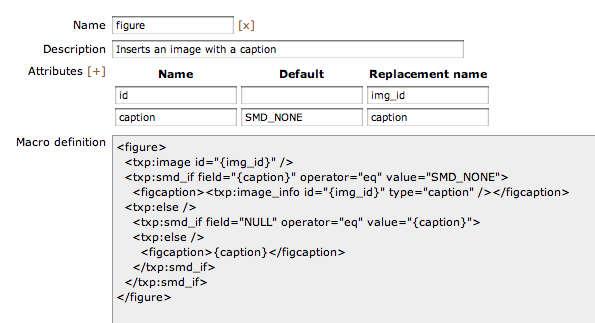
That gives you a tag that behaves as follows:
<txp:figure id=123" caption="My custom caption" />– inserts image 123 with an HTML5 figcaption entitled “My custom caption”.<txp:figure id=123" />– inserts image 123 with an HTML5 figcaption with whatever is set in your images caption field.<txp:figure id=123" caption="" />– inserts image 123 with an HTML5 figure and no figcaption.
Last edited by jakob (2011-05-09 06:55:11)
TXP Builders – finely-crafted code, design and txp
Offline

Re: smd_macro: Create custom virtual Txp tags that do stuff
Tried it, loved it. But one thing I really need your help with:
I have a macro with several attributes and I do not wish to type the entire thing in each time. How can I integrate the marco in the write tab (e.g. insert the specific macro at the push of a button so all I would have to do is fill in the values of the attributes)?
The idea is to create a review rating table with a star rating via macro and the individual ratings in five categories would be the attributes (as the name of the object under review).
Yoko for Textpattern – A free blog theme • Minimum Theme – If all you want to do is write.
Note: I am currently not actively using Textpattern, so I am not in the forums very often
Offline
Re: smd_macro: Create custom virtual Txp tags that do stuff
stephan wrote:
I do not wish to type the entire thing in each time
I think this was covered earlier in the thread. Although it seemed that masa couldn’t get upm_quicktags going in the latest Txp (and I couldn’t figure it out, though admittedly I didn’t put much effort into it) I’d wager Quick Tags are your best bet for offering this kind of functionality.
The smd plugin menagerie — for when you need one more gribble of power from Textpattern. Bleeding-edge code available on GitHub.
Hire Txp Builders – finely-crafted code, design and Txp
Offline
Re: smd_macro: Create custom virtual Txp tags that do stuff
Thanks, I shall give it a try and see how it works.
Update: OK, upm_quicktags was really simple to hack together so I could easily use smd_macro. Now also smd_gallery is as simple to integrate as pushing a buttong and putting some numbers in.
Thanks a lot for the wonderful plugins :-)
Last edited by stephan (2011-09-05 20:12:20)
Yoko for Textpattern – A free blog theme • Minimum Theme – If all you want to do is write.
Note: I am currently not actively using Textpattern, so I am not in the forums very often
Offline
#53 2011-11-11 14:34:24
- uli
- Moderator

- From: Cologne
- Registered: 2006-08-15
- Posts: 4,334
Re: smd_macro: Create custom virtual Txp tags that do stuff
I need some jump-start: The plugin is activated, smd_macro is compatible with my TXP version, I copied the tag name from the macro tab, but my tag is displayed literally in the source code. What might be the reason?
This is my tag:
<txp:bildzoom Beschreibung="Wallachei 1" Gruppenname="wallachei" Grosses-Bild-ID="149" Kleines-Bild-ID="54" />I also tried all lowercase attributes, but no luck.
In bad weather I never leave home without wet_plugout, smd_where_used and adi_form_links
Offline
Re: smd_macro: Create custom virtual Txp tags that do stuff
uli wrote:
my tag is displayed literally in the source code.
Urk. Without further info, no idea off the top of my head. Can you export your macro please so I can try it on my server with your settings? That would then either rule out or confirm plugin bug / incompatibility / mashed page / pebkac.
Thanks.
The smd plugin menagerie — for when you need one more gribble of power from Textpattern. Bleeding-edge code available on GitHub.
Hire Txp Builders – finely-crafted code, design and Txp
Offline
#55 2011-11-11 14:50:11
- uli
- Moderator
- From: Cologne
- Registered: 2006-08-15
- Posts: 4,334
Re: smd_macro: Create custom virtual Txp tags that do stuff
Hi Stef,
this is the file contents:
[bildzoom2]
description = "Lightbox"
attributes[] = "Beschreibung||text"
attributes[] = "Gruppenname|wallachei|gruppe"
attributes[] = "Grosses-Bild-ID||groß"
attributes[] = "Kleines-Bild-ID||klein"
definition = "PGEgdGl0bGU9Int0ZXh0fSIgY2xhc3M9ImZjeWJ4IiByZWw9IntncnVwcGV9IiBocmVmPSJodHRwOi8vbWFyaW5hLWJydW5vcmkuZGUvaW1hZ2VzL3tncm/Dn30uanBnIj48dHhwOmltYWdlIGNsYXNzPSJmbG9hdC1yIiBpZD0ie2tsZWlufSIgLz48L2E+"
Thanks for taking the time to look into it!
Uli
In bad weather I never leave home without wet_plugout, smd_where_used and adi_form_links
Offline
#56 2011-11-11 15:03:10
- uli
- Moderator
- From: Cologne
- Registered: 2006-08-15
- Posts: 4,334
Re: smd_macro: Create custom virtual Txp tags that do stuff
BTW, the file is a cloned export. Like iI said: I copied the macro name, so the 2 isn’t the reason. Just remarked the radix sign and tested with ASCII: still no joy.
In bad weather I never leave home without wet_plugout, smd_where_used and adi_form_links
Offline
Re: smd_macro: Create custom virtual Txp tags that do stuff
Uli
A few things. All of them to do with the plugin being too limited:
- At present, using dashes is not a good idea in attribute names. Switching to underscores made the tag work for me. I think this might be a PHP restriction as I don’t think variable/attribute names can contain dashes (not sure). I should probably outlaw their use in the plugin if that’s the case. Will fix either way.
- Your attributes should probably be defined in all lower case. I’m not sure how much difference it actually makes — probably not a lot — but it may be that the plugin assumes you’ll be using them lower case so it could be getting confused
- Using
großas a replacement is likely to confuse things because the column names aren’t defined as UTF-8. When I import the macro, for example, the replacement text isgro??on my server. That needs fixing in the next release.
To summarize, swap dashes for underscores and stick to ASCII attribute names/replacements. Using lower case is a last resort if the previous two workarounds don’t have any impact.
A more international-friendly version of the plugin will be available when I get a chance. Sorry for the headaches and short-sightedness of the code.
The smd plugin menagerie — for when you need one more gribble of power from Textpattern. Bleeding-edge code available on GitHub.
Hire Txp Builders – finely-crafted code, design and Txp
Offline
#58 2011-11-11 15:28:50
- uli
- Moderator
- From: Cologne
- Registered: 2006-08-15
- Posts: 4,334
Re: smd_macro: Create custom virtual Txp tags that do stuff
Stef, thank you very much for this lightning-fast response. All is working now :)
The hyphens were inserted by the plugin itself, I was so stupid to use blanks =0 which would’ve worked nowayneverever, so pebkac was the true reason. Thanks again for helping and for this wonderful machine.
In bad weather I never leave home without wet_plugout, smd_where_used and adi_form_links
Offline
Re: smd_macro: Create custom virtual Txp tags that do stuff
uli wrote:
The hyphens were inserted by the plugin itself
Oh lordy me, I’ll have to tend to that: it’s embarrassing. Thanks for letting me know.
The smd plugin menagerie — for when you need one more gribble of power from Textpattern. Bleeding-edge code available on GitHub.
Hire Txp Builders – finely-crafted code, design and Txp
Offline
Re: smd_macro: Create custom virtual Txp tags that do stuff
PEBKAC ?? never heard that one before – had to look it up. Very funny!
TXP Builders – finely-crafted code, design and txp
Offline