Textpattern CMS support forum
You are not logged in. Register | Login | Help
- Topics: Active | Unanswered

Re: Ebl_batchupload
steelcouch wrote:
hi, I would love your plugin, I am sure. but I am not able to use it. I am always getting “error 403”.
An error of that sort is always a permission denied error. Are you sure you’re chmodding the correct folder in the textpattern directory?
Offline
#77 2006-11-15 18:40:15
- Algaris
- Member
- From: England
- Registered: 2006-01-27
- Posts: 611
Re: Ebl_batchupload
TheEric wrote:
I fixed it on your server. I’ll have this permanently corrected in version 1.02 which I’ll have uploaded sometime tomorrow.
Basically, It’s an ID 10 T error on my part.
Thanks Eric. I tested it just now using Firefox 2 and had similar problems as before (no cats displayed and no images appearing in TXP), although this time I couldn’t find any left over images in my batchupload folder. I’ll wait for your new version before I do any more fiddling with it.
Thanks again.
Offline
Re: Ebl_batchupload
Umm…. I tested it on your server and it’s working (note the uploaded image). There was a minor issue due to the fact that it wasn’t setup in a root directory. What kind of computer / OS are you using? Also, have you updated to the latest version of flash?
Offline
#79 2006-11-15 19:27:48
- Algaris
- Member
- From: England
- Registered: 2006-01-27
- Posts: 611
Re: Ebl_batchupload
Yeah I noted the uploaded images. How strange. My computer is as follows:
AMD Athlon 64 3000+
1.81 GHZ
2GB RAM
Windows XP Professional x64 Edition
Adobe Flash Player 9
Firefox 2
I tested it just now with all my Firefox plug-ins disabled and it did the same as before, no cats and leaving the images in the batchupload folder.
I also tried it with IE7 and part way through uploading the images it stopped with a HTTP 403 Error. I’ve checked my batchupload folder and all the boxes to allow it to read and execute have been checked.
I’ll have to take a look on my work PC tomorrow to see if it behaves any differently.
Thank you for your help.
Offline
Re: Ebl_batchupload
Have you tried the demo I posted?
See if it works there. Also, which URL are you using to access it?
Offline
#81 2006-11-15 23:04:27
- Algaris
- Member
- From: England
- Registered: 2006-01-27
- Posts: 611
Re: Ebl_batchupload
The demo works fine without any problems. One thing different I did notice is that when the images have been uploaded in the flash movie it gives you a summary for each image (uploaded, thumbnails, etc.) where as in my one it stays blank.
Edit
I’ve finally figured out what was causing my issues. For some reason every time I logged into Textpattern it would strip the www. out of my address, so instead of http://www.mysite.co.uk/subdir/textpattern it would be http://mysite.co.uk/subdir/textpattern. Since my site URL in the preferences included the www. I can only assume this is was causing a conflict.
Trying it by manually adding the www. after logging in made everything work, categories appeared, images were uploaded into Textpattern, etc.
How very strange, I just wish my URL wouldn’t change after logging in. Anyway at least I know what was causing things to stop working.
Thank you for all your help.
Last edited by Algaris (2006-11-16 10:52:50)
Offline
#82 2006-11-16 07:59:16
- steelcouch
- New Member
- From: austria
- Registered: 2006-11-15
- Posts: 3
Re: Ebl_batchupload
An error of that sort is always a permission denied error. Are you sure you’re chmodding the correct folder in the textpattern directory?
yes, I am quite sure!
hm, perhaps this might be the reason for “error 403”: textpattern is not installed in the root directory – so, do I have to modify your plugin?
you’ll find the batchupload-folder (chmod 777) in the following directory:
www.mysite.com/folder1/textpattern/batchupload
and upload.swf is in
www.mysite.com/folder1/textpattern/
thanks!
Guenter
Offline
Re: Ebl_batchupload
It’s definitely a 406 error.
../textpattern/batchupload is chmod 777 and the swf is in the textpattern folder. I’m using version 1.01 on textpattern 4.04
Any ideas?
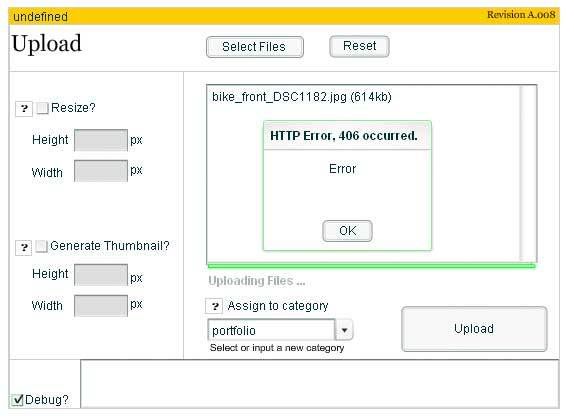
Last edited by arengula (2006-11-16 10:08:43)
Offline

Re: Ebl_batchupload
arengula wrote:
It’s definitely a 406 error.
That’s usually indicative that your host is running mod_security. Where is your site hosted?
Last edited by soulship (2006-11-16 12:11:40)
Offline
#85 2006-11-16 12:39:37
- saccade
- Plugin Author

- From: Neubeuern, Germany
- Registered: 2004-11-05
- Posts: 521
Re: Ebl_batchupload
On my sites ebl_batchupload is working fine!
And it doesn’t make a difference whether it is running in a root or in a subdirectory.
I only noticed some errors with resizing and generating thumbnails on one installation. (And it had worked correctly before with 0.9.1 on 11th Nov.)
Sending the long debug-text directly.
- when before I tried to create a thumbnail, there is a warning.
- if I uploaded without resize (this didn’t work, but there is a “none” in the list under Thumbnail) it will be deleted.
Last edited by saccade (2006-11-16 12:59:02)
Offline
#86 2006-11-16 12:56:10
- steelcouch
- New Member
- From: austria
- Registered: 2006-11-15
- Posts: 3
Re: Ebl_batchupload
Sending the long debug-text directly.
there is no debug-text shown although the box is checked….
<img src=“http:/www.steelcouch.at/error403.jpg” />
Last edited by steelcouch (2006-11-16 13:01:45)
Offline
Re: Ebl_batchupload
@Saccade – Was .9 working, and 1.0 not?
@Arengula
Try adding the following into your .htaccess file:
<IfModule mod_security.c>
SecFilterEngine Off
SecFilterScanPOST Off
</IfModule>
Offline
#88 2006-11-16 13:04:33
- saccade
- Plugin Author
- From: Neubeuern, Germany
- Registered: 2004-11-05
- Posts: 521
Re: Ebl_batchupload
@theEric
now difficult to say. On 11.Nov everything was ok, I think this was before 1.0 came.
Then I only shortly had 1.0 installed and the updated with 1.01 and tested now with 1.01.
I suppose I didn’t test really with 1.0.
Offline
#89 2006-11-16 13:09:13
- saccade
- Plugin Author
- From: Neubeuern, Germany
- Registered: 2004-11-05
- Posts: 521
Re: Ebl_batchupload
Stepped back to 1.0
and everything is ok again in my subdirectory-installation! :-)
(except now I think have to manually delete the defect images from the database, but thats no problem)
Just for debugging: When I try to delete one of the mis-loaded images, the following message comes:
Warning: unlink(/homepages/mysubdirectory/images/41.jpg) [function.unlink]: Datei oder Verzeichnis nicht gefunden in /homepages/mysubdirectory/textpattern/include/txp_image.php on line 439
“Datei oder Verzeichnis nicht gefunden” = File or directory not found
Last edited by saccade (2006-11-16 13:12:41)
Offline
Re: Ebl_batchupload
@ soulship – hostgator
@ TheEric – Thanks for the reply. I’ve updated the .htaccess file and now I get a 403 error but …/textpattern/batchupload is 777
Offline