Textpattern CMS support forum
You are not logged in. Register | Login | Help
- Topics: Active | Unanswered

Re: [Textile] Figures and figcaptions
Destry wrote #300701:
That scenario and form would make a nice Textpattern Tip (you listening, Stubbs?).
Anyone wants to submit a tip/tutorial is most welcome..sorry haven’t followed this thread very closely, but always happy for more submissions! Back to the topic…
Offline
Re: [Textile] Figures and figcaptions
That was fast reply. You’re indeed awake and following. ;)
Submissions noted.
Offline

Re: [Textile] Figures and figcaptions
Destry wrote #300701:
That scenario and form would make a nice Textpattern Tip (you listening, Stubbs?). I remember someone once suggesting a similar doc source specifically for “smd_macro” solutions too, also a good idea.
I found it here and then saw it was me that posted it. I’ll replicate it here:
smd_macro for txp:figure tag
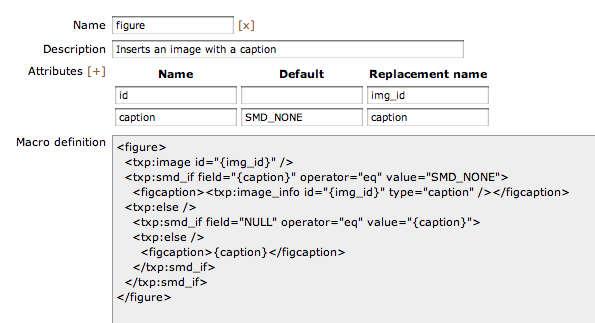
And here for cutting and pasting:
| name | default | replacement |
| id | img_id | |
| caption | NOTSPECIFIED | caption |
<figure>
  <txp:image id="{img_id}" />
  <txp:smd_if field="{caption}" operator="eq" value="NOTSPECIFIED">
    <figcaption><txp:image_info id="{img_id}" type="caption" /></figcaption>
  <txp:else />
    <txp:smd_if field="NULL" operator="eq" value="{caption}">
    <txp:else />
      <figcaption>{caption}</figcaption>
    </txp:smd_if>
  </txp:smd_if>
</figure>
Note that this also requires smd_if. That gives you a tag that behaves as follows:
<txp:figure id="123" caption="My custom caption" />
– inserts image 123 with an HTML5 figcaption entitled “My custom caption”.<txp:figure id="123" />
– inserts image 123 with an HTML5 figcaption with whatever is set in your images caption field.<txp:figure id="123" caption="" />
– inserts image 123 with an HTML5 figure and no fig caption.
BTW: to achieve the differentiation between “no caption attribute specified” (case 2) and “caption attribute specified but blank” (case 3), you need to set a dummy value as the the default value in the attributes section of smd_macro. That’s what the NOTSPECIFIED is for.
TXP Builders – finely-crafted code, design and txp
Offline
Re: [Textile] Figures and figcaptions
And this is how the same txp:figure tag can be done with rah_beacon. Once you’ve installed rah_beacon, you only need create a form called figure and insert this:
<txp:rah_beacon_atts caption="NOTSPECIFIED" />
<figure>
  <txp:image id='<txp:variable name="img_id" />' />
  <txp:if_variable name="caption" value="NOTSPECIFIED">
    <figcaption><txp:image_info id='<txp:variable name="img_id" />' type="caption" /></figcaption>
  <txp:else />
    <txp:if_variable name="caption" value="">
    <txp:else />
      <figcaption><txp:variable name="caption" /></figcaption>
    </txp:if_variable>
  </txp:if_variable>
</figure>
rah_beacon allows you to tag on any attribute and it will be made into a variable for use in your form. The rah_beacon_atts tag allows you to set default values for variables if not specified.
That gives you a tag that behaves as follows:
<txp:figure img_id="123" caption="My custom caption" />
– inserts image 123 with an HTML5 figcaption entitled “My custom caption”.<txp:figure img_id="123" />
– inserts image 123 with an HTML5 figcaption with whatever is set in your images caption field.<txp:figure img_id="123" caption="" />
– inserts image 123 with an HTML5 figure and no fig caption.
– – –
You can add further attributes, for example this would be how to add a simple class attribute:
<txp:figure img_id="123" class="right" />and then add:
<figure<txp:if_variable name="class" value=""><txp:else /> class="<txp:variable name="class" />"</txp:if_variable>>to your form’s code.
Likewise the above code (both for rah_beacon and smd_macro) could be expanded with a further if-case to trap the situation where the caption should be used from the image, but the image has no caption and thus prevent an empty figcaption tag from being output.
– – –
smd_macro and rah_beacon both do very similar things and have advantages and disadvantages.
rah_beacon:
- very easy to create: just add a form like you would with a normal txp tag
- easy to add attributes – they automatically become variables and are removed again after use.
- easier handling when working with flat files in your own code editor
- take care when naming attributes not to overwrite any other variables you may have on the page. If you think there is a risk of that happening, I would suggest “namespacing” your other site / page variables and keeping simpler attributes for your macro tags.
- if you add your own
has-whateverhelper variables in your form code, be aware that that won’t be removed at the end of the macro and needs unsetting/resetting at the end/beginning of the form. You notice that when you use severaltxp:figuretags in one document and wonder why the first one behaves properly but the rest don’t.
smd_macro:
- has a little descriptor field
- has its own edit window so doesn’t pollute your txp forms
- no danger of conflicting with your txp:variables
- macros can be exported and imported
- not quite as easy to work with for flat files
With both these options, you need to be aware that you’re introducing txp tags that are not part of the normal txp tagset, and that might confuse future site admins (and forum helpers!) if they try and look up that tag. You could prefix the tag with your own initials to make that clearer. Personally I prefer simpler tags for the end user.
TXP Builders – finely-crafted code, design and txp
Offline
Re: [Textile] Figures and figcaptions
Jakob, you go beyond the call of duty, but it’s so appreciated. Your help/docs are always detailed and clear.
I have some other headaches to work out at the moment, but I’ll get back to trying one of these in the near future.
Offline
Re: [Textile] Figures and figcaptions
If either of you manages to get a write up done for Textpattern Tips please feel free to send it in. Thanks.
Offline